Home Features Pricing App AI Advisor Docs Compare About Training Contact Log In Get It Free
Every Feature, Zero Cost

THIS IS WHAT FREE LOOKS LIKE

While the other guys lock features behind $400/month paywalls, Shop Commander gives you everything — every feature, every module, every user — for nothing. Built by a shop owner who got tired of writing checks to software companies. Read our story.

$0
Monthly Cost
Users Included
0
Per-User Fees
0
Feature Paywalls
See Pricing →
Every Module Below Is a Switch

YOUR SHOP, YOUR WAY

Everything on this page is included free — and every module of it is optional. Turn on what your shop uses, turn off what it doesn't, and navigation, dashboards, and reports follow. Don't want AI? Turn it off. See how shops configure it →

📞
The Phone, Handled

AI VOICE SERVICE ADVISOR AI

An AI that answers your shop's phone and actually does the work: books appointments against live availability, gives callers their repair status, reads estimates with prices, and records approvals in the customer's own words — in English and French, during hours and after. See the full AI Advisor page.

Every Call Answered

Advisor with a customer, techs under cars, shop closed for the night — the phone still gets picked up. Callers reach a capable advisor instead of voicemail, and voicemail is where jobs go to die.

Real Appointment Booking

Checks your live calendar for the requested date, books the slot, captures year/make/model and the customer's concern verbatim, and texts a confirmation — all before the caller hangs up.

Live Repair Status

"Is my car ready?" gets answered from the actual repair order — the customer-safe status, spoken. Your counter stops repeating itself and your customers stop waiting on hold.

Estimate Approvals by Phone

Reads the estimate line by line with spoken prices, records each approve or decline with the customer's own words, timestamped on the RO. Declines feed straight into declined-job recovery.

Outbound Approval Calls

The AI calls the customer, walks the estimate, and brings back the decision. The follow-up call your advisor never has time to make now makes itself.

Knows the Caller

Caller ID matches the caller to their record and vehicles. Sensitive details — status, estimates, approvals — require stepped-up identity verification before a word is spoken.

Speaks 10 Languages EN + FR + 8

English and French tuned by hand — plus Spanish, German, Italian, Portuguese, Dutch, Hindi, Japanese, and Russian. The whole conversation in whichever language the caller opens with.

Tire Quotes by Phone

"What do winter tires cost for my RAV4?" The AI resolves the fitment, searches your configured tire sources, quotes real options with prices, and books the install — on the call.

Instant Human Handoff

The moment a caller asks for a person, the call transfers to your counter — and if nobody can grab it, a callback request lands with name, number, and reason attached.

📋
The Money Maker

DIGITAL VEHICLE INSPECTIONS

The single biggest ARO booster in any shop. Techs inspect on a tablet, customers approve on their phone. Shops using DVIs consistently see 20-30% higher average repair orders. Other platforms charge $200+/month for this. We charge nothing. See the comparison. Read our DVI best practices guide to get the most out of every inspection.

Green / Yellow / Red Scoring

Every inspection item gets a color-coded status. Customers instantly understand what's urgent, what's coming soon, and what's fine. No jargon, no confusion — just clear visual communication that builds trust and sells work honestly.

Photo & Video Markup included

Annotate photos with arrows, circles, and text. Attach video clips of the problem. Show don't tell — it builds trust and sells work without the hard sell. Customers see exactly what you see.

AI Note Cleanup AI

Tech writes "serp belt cracked bad needs replacement." AI rewrites it as "Your serpentine belt is cracked and should be replaced to prevent a breakdown." Professional customer-facing language, every single time.

Offline-First PWA

The inspection app works without WiFi. Your tech completes the full inspection in the bay, and it syncs automatically when the tablet reconnects. No dead zones, no lost data, no excuses.

One-Tap Customer Approval

Customer receives the inspection via SMS, reviews findings with photos, and approves work with a single tap and digital signature. No phone tag. No waiting on callbacks. Authorization captured and timestamped.

Engagement Tracking

See when the customer opened the inspection and how long they looked. Know who's engaged before you follow up. Data-driven service advising, not guesswork.

Add to Estimate

From any inspection finding, one tap creates a line item on the estimate with the correct canned job, labor, and parts. Finding to revenue in seconds. No re-typing, no missed items.

Inspection Templates

Customizable templates by vehicle type — oil change inspection, full multi-point, pre-purchase, seasonal check. Create your own templates or use the built-in library. Consistent inspections across your entire team.

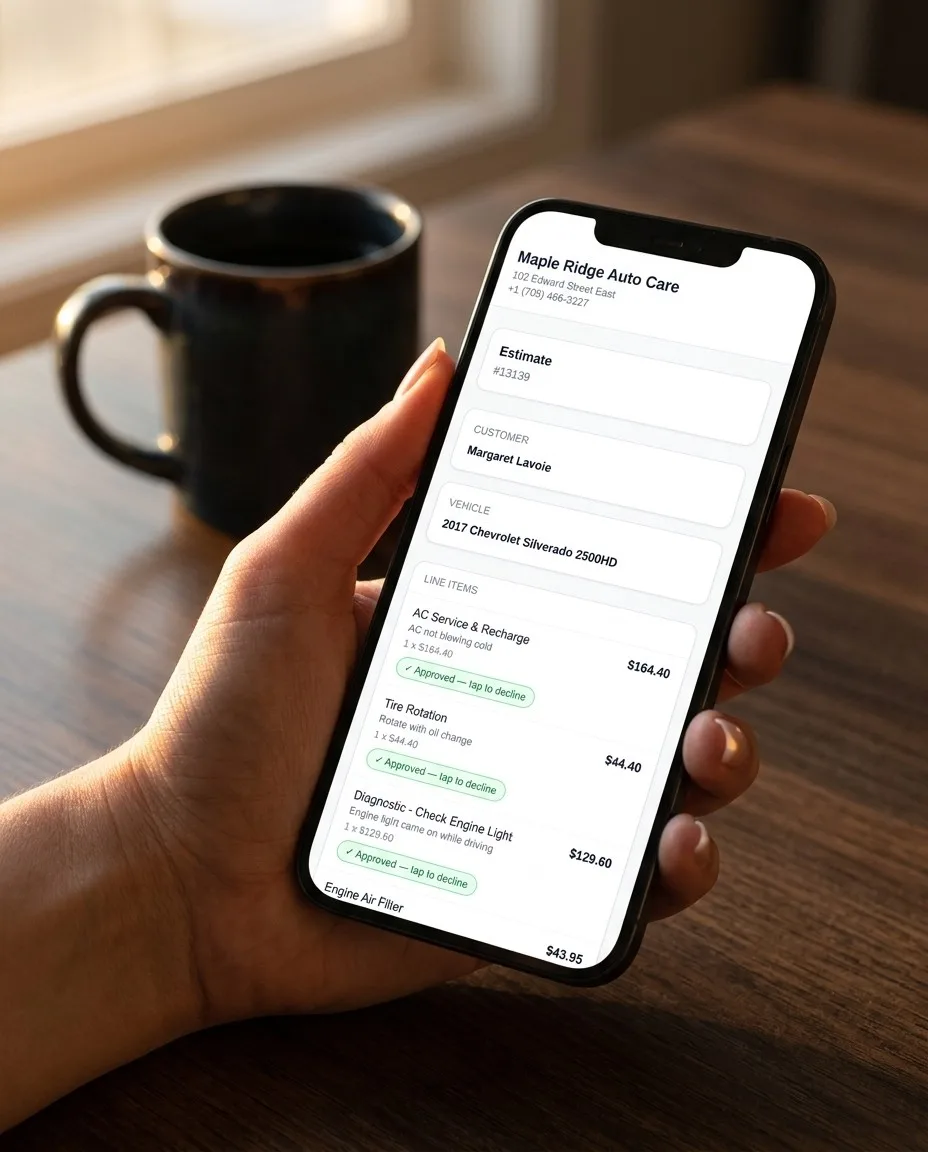
Customer approving estimate line items on their phone
Estimates land by text — customers approve or decline line by line.
💬
Built In, Not Bolted On

TWO-WAY SMS & MESSAGING

Real texting inside every repair order. Not a third-party add-on. Not a $300/month upgrade. Built directly into the platform from day one. Your customers already prefer texting — now your shop does too.

Two-Way Conversations

Customers text back and you see it instantly inside the RO. Full threaded conversation history. No personal phones, no missed messages, no "I thought you texted them" confusion.

Automated Status Updates

Vehicle received, inspection ready, estimate sent, work approved, ready for pickup — each status change auto-texts the customer. Zero effort from your team. Fewer "is my car ready?" calls.

MMS Photos & Videos

Send photos and video clips directly via text message. Show the customer the cracked belt from the bay without them needing to open a link. Visual proof at their fingertips.

Template Library

Pre-written message templates for every scenario — appointment reminders, estimate follow-ups, pickup notices, seasonal promos. Customize them or create your own. Consistent messaging across your team.

Estimate Approval Links

SMS sends a link to the estimate. Customer reviews line items, taps approve, signs digitally. Authorization captured and timestamped in the RO. No paperwork, no phone tag.

Payment Tracking

Record cash and card payments against every invoice. Split payments across methods and track outstanding balances at a glance. Every payment tied to the RO, so your books stay clean.
📊
Total Visibility

WORKFLOW & JOB MANAGEMENT

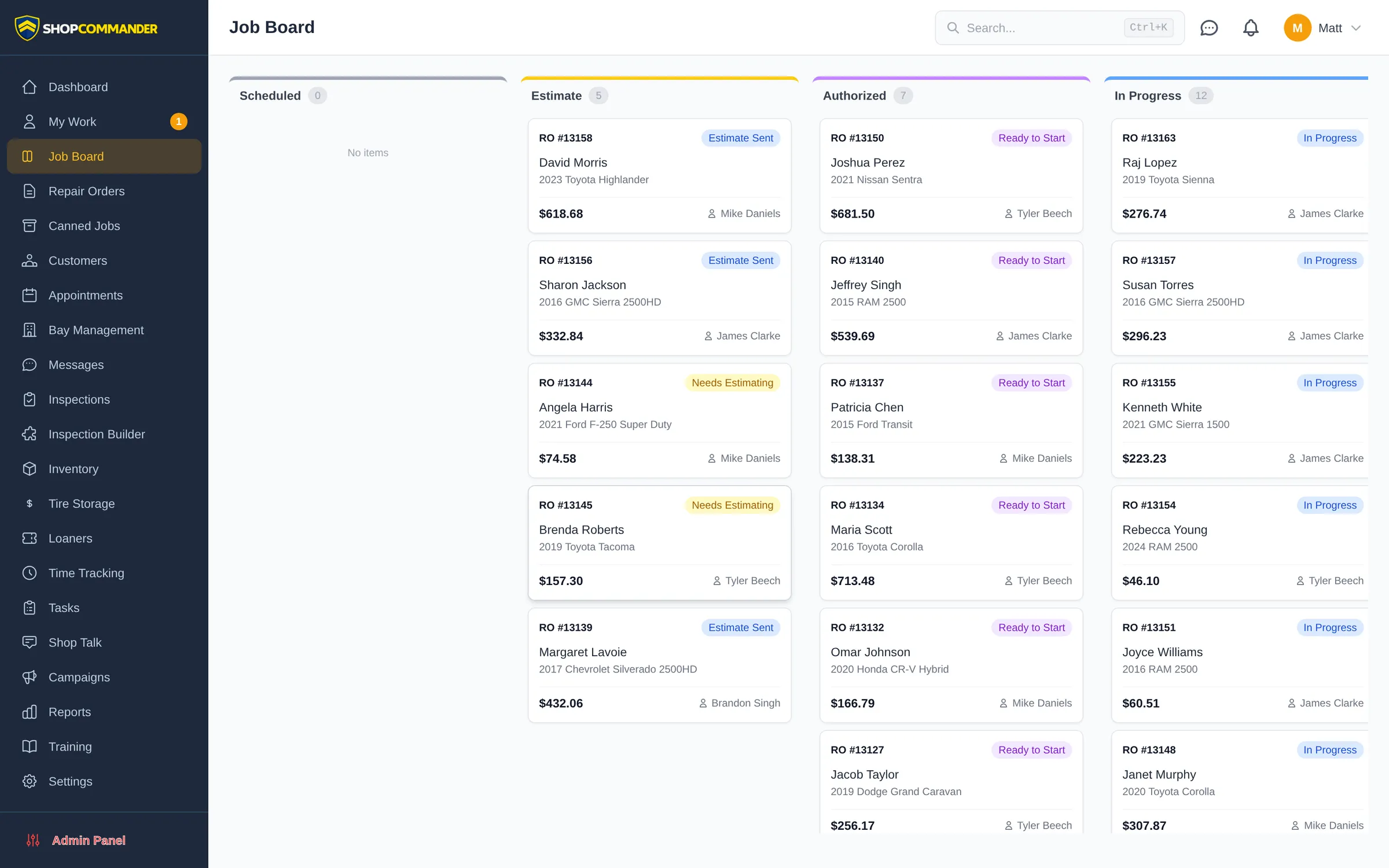
See every vehicle, every job, every tech — at a glance. Drag-and-drop Kanban board that tracks the entire repair lifecycle from check-in to checkout. Real-time WebSocket updates mean everyone sees changes instantly.

Shop Commander job board showing repair orders across estimate, authorized, and in-progress columns
The live job board — actual product, real workflow

Kanban Job Board

Visual drag-and-drop board with customizable columns. Color-coded by status, filterable by tech, sortable by promise time. Your whole shop on one screen. Move jobs with a flick.

10-Step Workflow

QR check-in, received, inspection, estimate, approval, in-progress, QC, ready, invoice, review request. Every step tracked and timed. Nothing falls through the cracks.

Tech Assignment & Time Tracking

Assign jobs to techs, track clock-in/clock-out per RO, measure efficiency against book time. Know exactly who did what and how long it took. Data for coaching conversations.

QR Code Check-In

Customer scans a QR code, fills in their info on their phone, and a new RO is started automatically. No clipboard, no data entry, no waiting in line. Fast and clean.

Promise Time Alerts

Set promised completion times. The system alerts your service writer when a job is at risk of missing its promise. No more angry "where's my car" calls. Stay ahead of the problem.

Bay Management

Visualize which bays are occupied, which are free, and which jobs are queued for which bay. Optimize your physical space alongside your digital workflow. Maximum throughput.

📅
Fill the Bays

SCHEDULING & ONLINE BOOKING

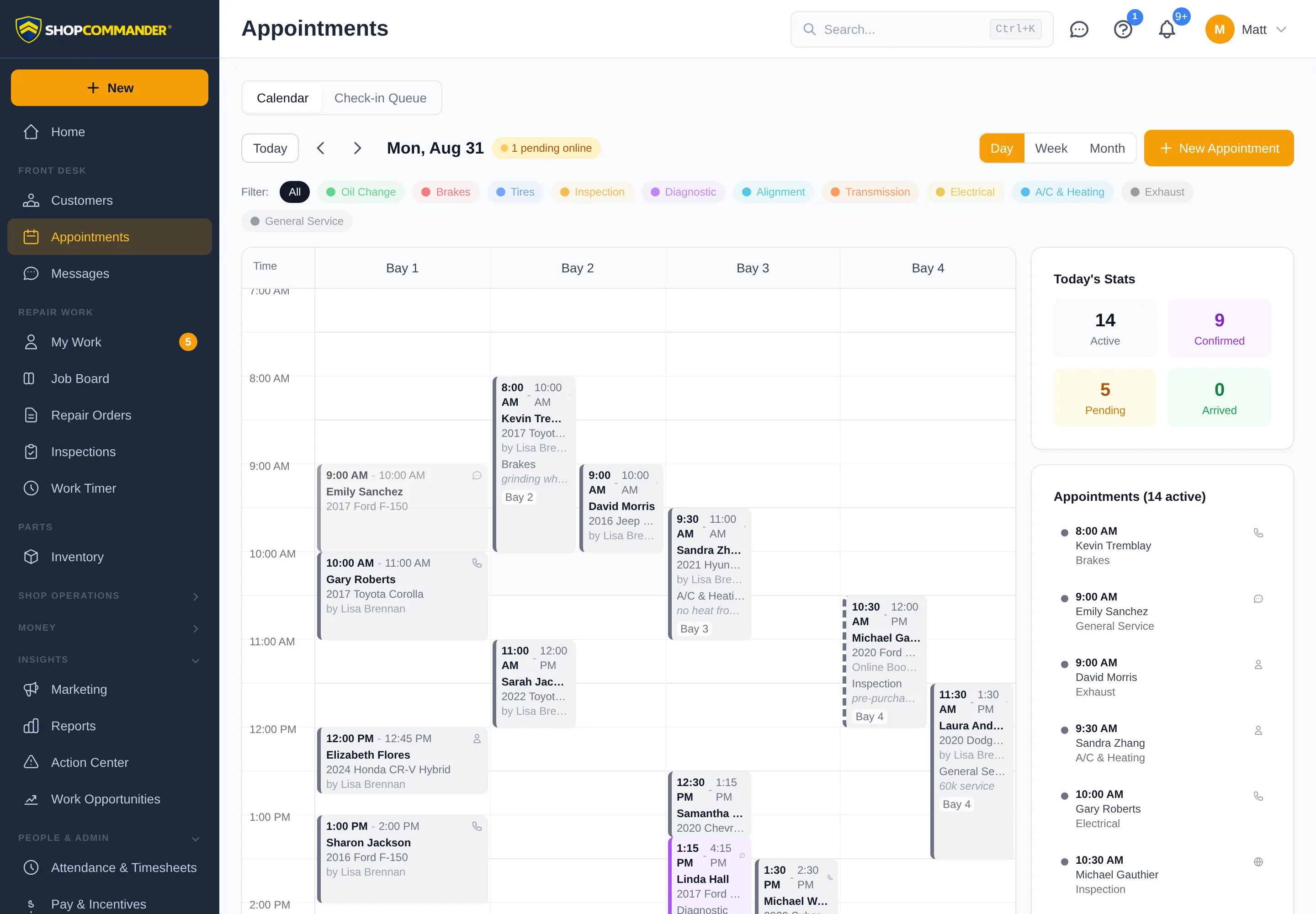
A bay-aware calendar for the counter, a booking page for your customers, and an AI that books over the phone — all writing to the same schedule, all respecting the hours and capacity you actually have.

Shop Commander appointments calendar with bay columns, day stats, and an online booking
The appointment calendar — that 8:00 AM slot booked itself online

Bay-Aware Calendar

Day, week, and month views across your bays. Service-type color coding, confirmations, arrivals, and a check-in queue that hands the vehicle to the shop with its context intact.

Online Booking

A public booking page that only offers slots you actually have — business hours, holidays, one-off closures, and bay capacity are enforced on the server, not just hidden in the calendar widget.

Booked Three Ways

Counter, customer, or AI — staff book on the calendar, customers book online, and the AI Voice Advisor books over the phone. One schedule, no double-booking.

Reminders That Land

Appointment reminder texts — and if you want, the AI makes the reminder call and records whether the customer is still coming.

Technician Schedules & Time Off

Work schedules, time off, and shop closures feed real capacity — so the calendar and utilization numbers reflect who's actually on the floor.

Appointment → Repair Order

An arrival converts to a checked-in RO in one step, exactly once — the appointment, its notes, and its history stay linked to the work that came from it.

💰
Your Secret Weapon

DECLINED JOB RECOVERY

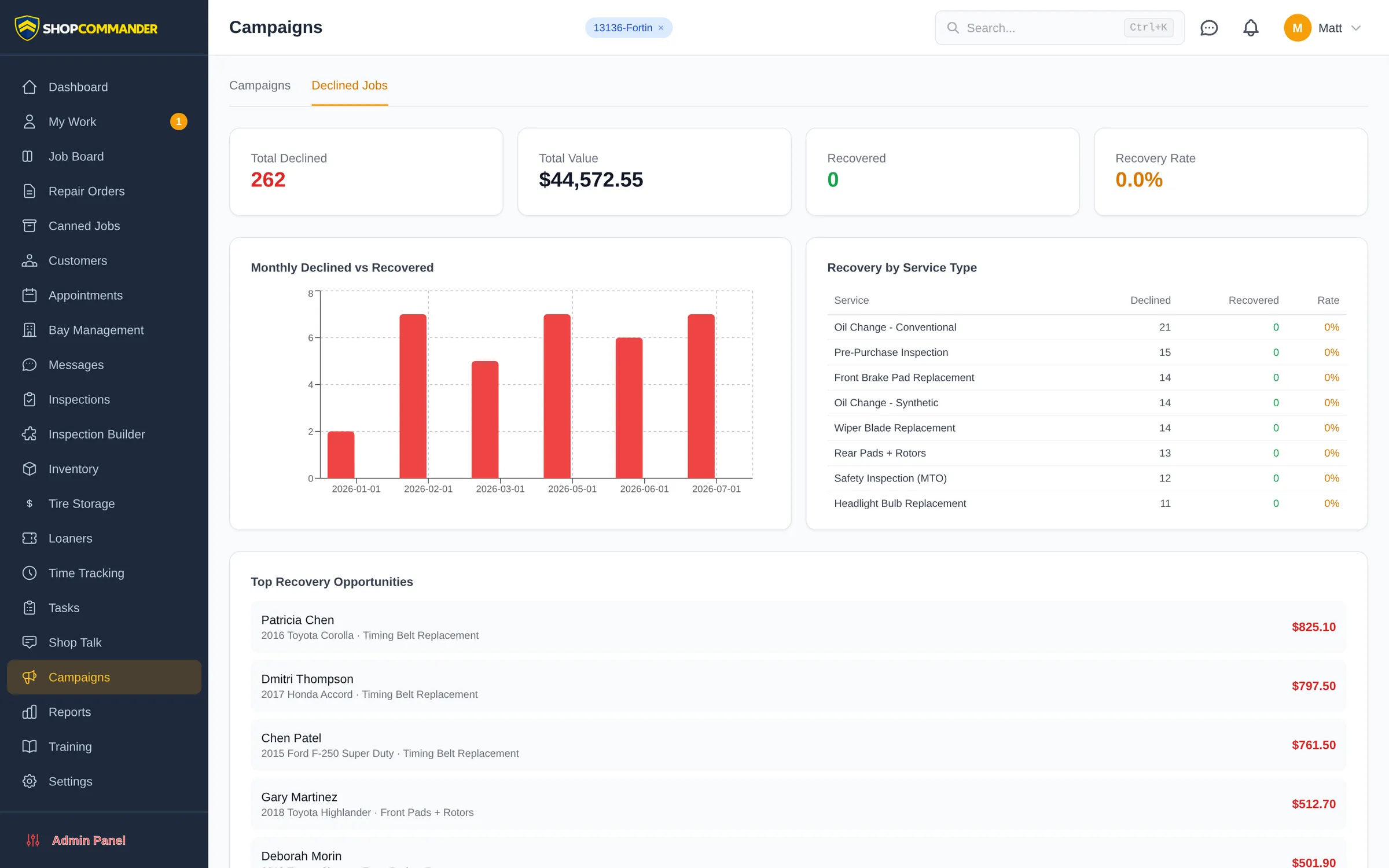
The average shop has $50,000+ in declined work sitting in their system. Most software ignores it. Shop Commander automatically chases it down and brings it back. This feature alone would justify a $200/month subscription. It's free. See our pricing. Learn how to increase your ARO with these proven strategies.

Declined jobs pipeline listing deferred work by customer, vehicle, value, and follow-up status
The declined work pipeline — every deferred job tracked until it comes back

7/30/60 Day Auto Follow-Up

Every declined job gets automatic SMS follow-ups at 7, 30, and 60 days (intervals configurable). Each message references the original finding and vehicle. Set it and forget it — the money comes back on its own.

Declined Work Pipeline

Visual dashboard showing all declined work by customer, value, age, and status. See your total pipeline and recovery rate at a glance. Know exactly how much money is sitting on the table waiting to be picked up.

One-Click Rebooking

Customer clicks the follow-up link, reviews the original recommendation with photos, and books an appointment — all without calling the shop. Friction removed. Conversion increased.

Recovery Analytics

Track recovery rate, recovered revenue, average time to recovery, and which follow-up interval converts best. Prove the ROI in real numbers. Know exactly what this feature puts back in your pocket.

📣
Automated Marketing

SEASONAL CAMPAIGNS & REVIEW GENERATION

Pre-built marketing campaigns that fire automatically based on season, vehicle data, and service history. Plus a Google review pipeline that actually works. Shopmonkey charges $315/month extra for this. We charge $0.

Seasonal Campaign Templates

Rust proofing in fall, tire swap reminders in spring and fall, AC service in summer, battery checks in winter, coolant flush before the heat. All pre-built and ready to go. Just turn them on.

Smart Targeting

Campaigns target the right customers automatically. Tire swap reminders go to customers with stored tires. AC campaigns go to vehicles with 2+ year old AC service. No manual list building — targeting comes straight from your service history.

Google Review Pipeline

3 days after pickup, happy customers automatically get a text asking for a Google review. With feedback-first mode, review requests only go to customers who reply that they had a great experience. Build your reputation on autopilot.

Campaign ROI Tracking

See exactly how many appointments, how much revenue, and what ROI each campaign generated. Kill what doesn't work, double down on what does. Marketing with accountability.

📝
Get Paid Faster

ESTIMATES, INVOICING & PAYMENTS

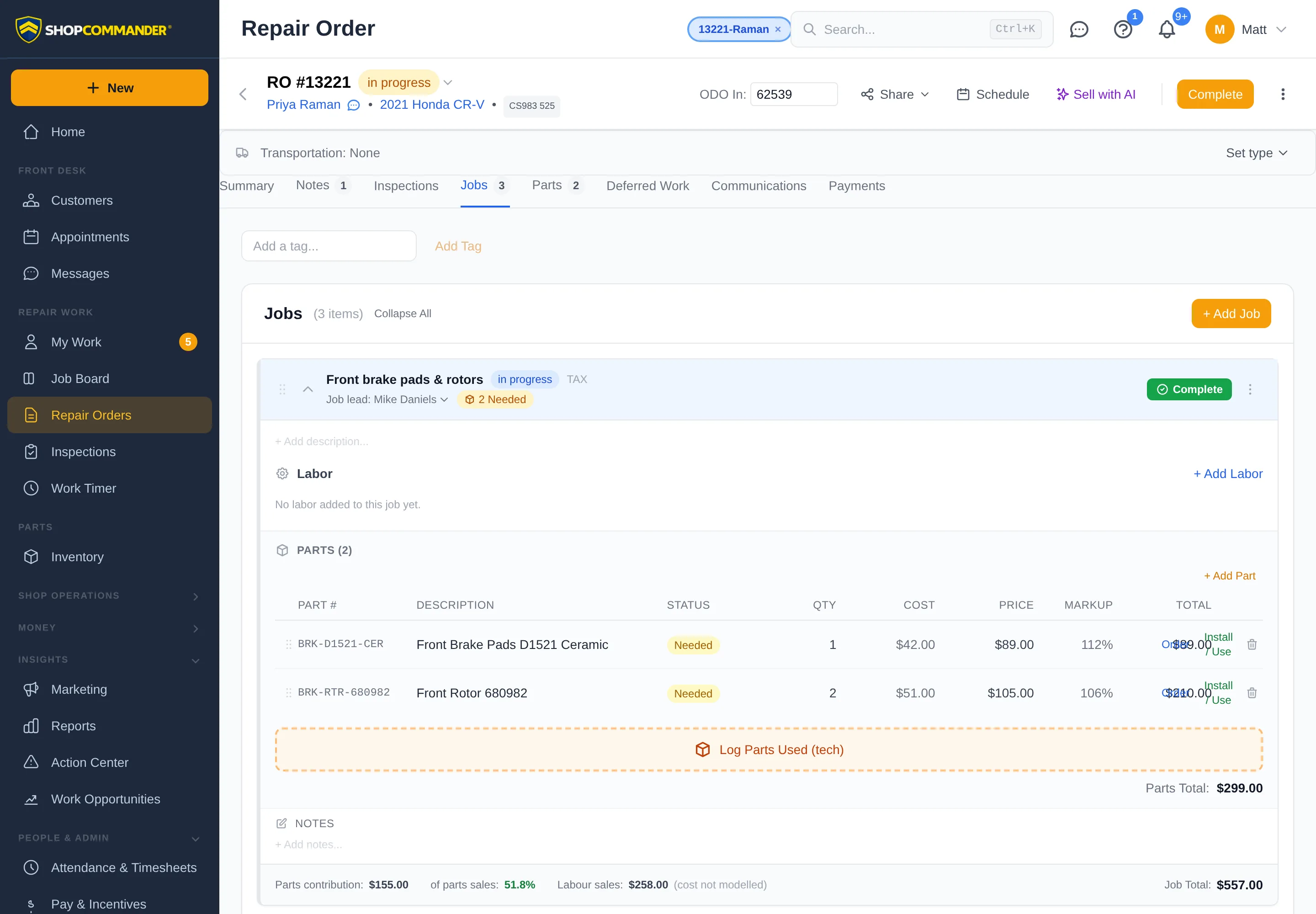
Professional estimates in 60 seconds. Digital authorizations that stay bound to the version the customer saw. Invoices that post as locked documents. Cards by text link or countertop terminal. The full financial workflow from quote to cash — with books you can defend.

Shop Commander repair order with a posted immutable invoice, jobs, parts, and payments
A posted invoice is locked — corrections are dated credit notes, never silent edits

Text-to-Pay & Card Terminals

Text a secure payment link the customer taps to pay, or push the charge to a countertop reader — credit, debit, Interac. Payments land on the RO by themselves. Split across methods, track store credit, refund cleanly.

Invoices That Can't Quietly Change

Posting an invoice freezes it — number, totals, taxes. Corrections are dated credit notes, so last month's numbers are still last month's numbers. Your accountant will notice the difference.

Revisioned Estimates

Every material change makes a new estimate revision, and authorizations bind to the exact version the customer saw. "That's not what I approved" stops being a conversation.

Canned Jobs Library

Pre-built service templates with labor times, parts lists, and descriptions. Oil change, brake job, timing belt — one click to add to any RO. Build your own library or use the defaults.

AI Job Suggestions AI

Based on vehicle make, model, mileage, and service history, AI suggests likely needed services. "2019 Civic at 90K — recommend spark plugs, transmission fluid, brake fluid flush." Proactive upselling that makes sense.

Digital Signatures

Customers sign estimates and invoices digitally via their phone. Timestamped, stored, and attached to the RO. No paper, no disputes, no "I never authorized that" conversations.

PDF Generation

Professional branded PDFs for estimates, invoices, and inspection reports. Auto-emailed, auto-archived. Your logo, your colors, your shop's identity on every document.

HST & Tax Management

Canadian tax handling built in from day one. HST on labor and parts, tax-exempt items, PST/GST for other provinces. Not an afterthought — it's the default. US sales tax supported too.

QuickBooks Export

Export invoices in QuickBooks-compatible CSV format. Keep your bookkeeper happy without double-entry. Clean data, every time.

🛡
Stand Behind the Work

WARRANTY CLAIMS & COMEBACKS

Parts warranty, labor claims, comebacks — most software pretends they don't happen. Shop Commander tracks the coverage, the claim, and the money until it actually lands.

Coverage on Every Job

Warranty terms recorded with the work — so when the customer comes back at month eleven, you know exactly what was promised and whether it's covered.

Claims & Settlements

File the claim, track its decision, and record the settlement when the provider pays. An approved claim isn't cash — the receivable stays visible until the cheque clears.

Evidence Packet

One click prints the claim packet — the RO, the findings, the photos, the paper trail your parts supplier asks for before they honour anything.

Comebacks, Honestly

Corrective work links to the original job, so comeback rates are real numbers — not a label anyone can slap on a job to make a tech look bad.

🔧
Parts & Stock

INVENTORY: PARTS, TIRES, BATTERIES & FLUIDS

One stock ledger, four product families. Ordinary parts, tires with real sizes, batteries with group numbers, fluids by the litre — with reservations, purchasing, receiving, returns, and counts that always reconcile. What the screen says is what the shelf holds.

One Ledger, Always Balanced

Every stock movement is recorded — received, reserved, used, returned, counted. Reservations follow authorization: approve the job and the parts are held; decline it and they free up.

Tire Inventory

Tires carry canonical sizes, seasons, speed ratings, and new/used condition. Search by 225/45R17. Import your supplier list by CSV. This is your merchandise — Tire Storage tracks the customer-owned sets.

Battery & Fluid Inventory

Batteries carry group sizes and specs. Fluids and supplies stock by the litre with decimal precision — bulk oil finally counts like bulk oil instead of "1 each."

Parts Needed Aggregation

One screen showing all parts needed across all active ROs, grouped by vendor. Generate a single order list per supplier instead of calling for each job.

Purchase Orders & Receiving

Create POs, submit to vendors, receive partial or full shipments — and only receiving changes what's on hand, so an ordered part never masquerades as shelf stock.

Returns, Counts & Low Stock

Ship returns and track the refund. Cycle counts that post real adjustments. Low-stock alerts before you're scrambling for oil filters on a Tuesday morning.

🔑
Know Every Vehicle

VIN DECODE, VEHICLE HISTORY & CUSTOMER CRM

Free VIN decoding — typed on the web, or scanned with the camera on the mobile app. Complete service history. Customer profiles with lifetime value tracking. Know every vehicle and every customer before they walk through the door.

Free NHTSA VIN Decode

130+ vehicle attributes decoded instantly from VIN. Year, make, model, engine, transmission, trim, drive type, and more. No per-lookup fees. Ever. Unlimited decodes for every user at every shop.

VIN & Plate Scanning

On the mobile app, the camera reads the VIN barcode, the printed VIN, or the licence plate — and the vehicle decodes itself. A plate scan pulls up the car and its owner. You confirm every result; recognition runs entirely on the phone.

Odometer Scan

Photograph the cluster and the reading fills itself in — with a warning if it looks lower than the vehicle's history, and an optional photo attached to the work order as timestamped proof of mileage at check-in.

Complete Service History

Every RO, every inspection, every declined job — all linked to the vehicle. Pull up any car and see its entire life story at your shop. Context at your fingertips for smarter service advising.

Customer Portal

One secure link shows a customer their vehicles, full service history, inspections, warranties, and declined work. Links expire on schedule, and there’s nothing to install.

Customer Profiles

Contact info, communication preferences, all vehicles, lifetime spend, visit frequency, average ticket, preferred tech. Know your customer before they walk in. Build relationships that drive retention.

Tire Storage Tracking

Track stored tire sets with location, tread depth, DOT codes, and seasonal swap notifications. Automated reminders when swap season hits. A feature nobody else offers — we do, for free.

Loaner Vehicle Management

Digital check-out agreements signed on the customer’s phone — and the signed copy is frozen forever, so nobody edits a contract after the fact. Mileage, fuel, damage notes, returns.

Beyond Repair Orders

INTERNAL TASK MANAGEMENT & TIME TRACKING

Not everything in your shop is a repair order. Cleaning, maintenance, parts runs, training — manage it all with a built-in task system that lives alongside your Kanban board.

Auto-Numbered Tasks

Sequential task numbers per shop (T-001, T-002). Create tasks for any non-RO work — cleaning bays, organizing parts, equipment maintenance, training sessions.

Priority & Categories

Low, normal, high, urgent with color-coded indicators. Categories for cleaning, maintenance, errands, training, admin, and more. Status workflow: Open, In Progress, Done, Blocked, Waiting.

Assignment & Checklists

Assign tasks to specific team members. Add checklist items with completion tracking and progress bars. Set due dates with overdue highlighting. Add comments and file attachments.

Recurring Tasks auto

Define tasks that regenerate automatically on a schedule — daily, weekly, biweekly, or monthly. Bay cleaning every Friday. Safety check every Monday. Set it once, never think about it again.

Board Integration

Tasks appear on your main Kanban board alongside repair orders (purple-bordered cards). Drag-and-drop between columns. Toggle visibility in board settings.

Work Timer

Techs clock productive time against real jobs and tasks with live timers. Corrections are reviewed, not silently edited. Productive time, attendance, and sold hours stay separate — so every number means one thing.

💼
The Back Office, Handled

WORKFORCE & BUSINESS OFFICE

Timesheets, pay plans, vendor bills, the cash drawer — the unglamorous work that eats your evenings. Built into the same system as the shop floor, so the numbers agree with each other.

Attendance & Timesheets

Clock in, clock out, correction requests, submission and approval. Attendance is its own record — deliberately separate from job timers, so payroll math starts from clean inputs.

Pay & Incentives

Hourly, flat-rate, and incentive pay plans recorded per employee — with the worked and sold hours behind them visible to the people allowed to see them.

Accounts Payable

Vendor bills tracked from received to paid. Know what you owe, to whom, and when — without a shoebox of invoices riding shotgun in the truck.

Cash Drawer

Count the float, reconcile cash tenders at close, and record over/short honestly. The drawer ties to the same payment ledger as everything else.

Known Contribution

Margin reporting that tells the truth: where costs are recorded, you see contribution; where they aren't, it says so — instead of dressing up a guess as profit.

Access Control

Role templates plus per-person overrides decide who sees pay, costs, and reports. Sensitive numbers stay with the people who are supposed to have them.

📈
Data-Driven Decisions

REPORTS & ANALYTICS

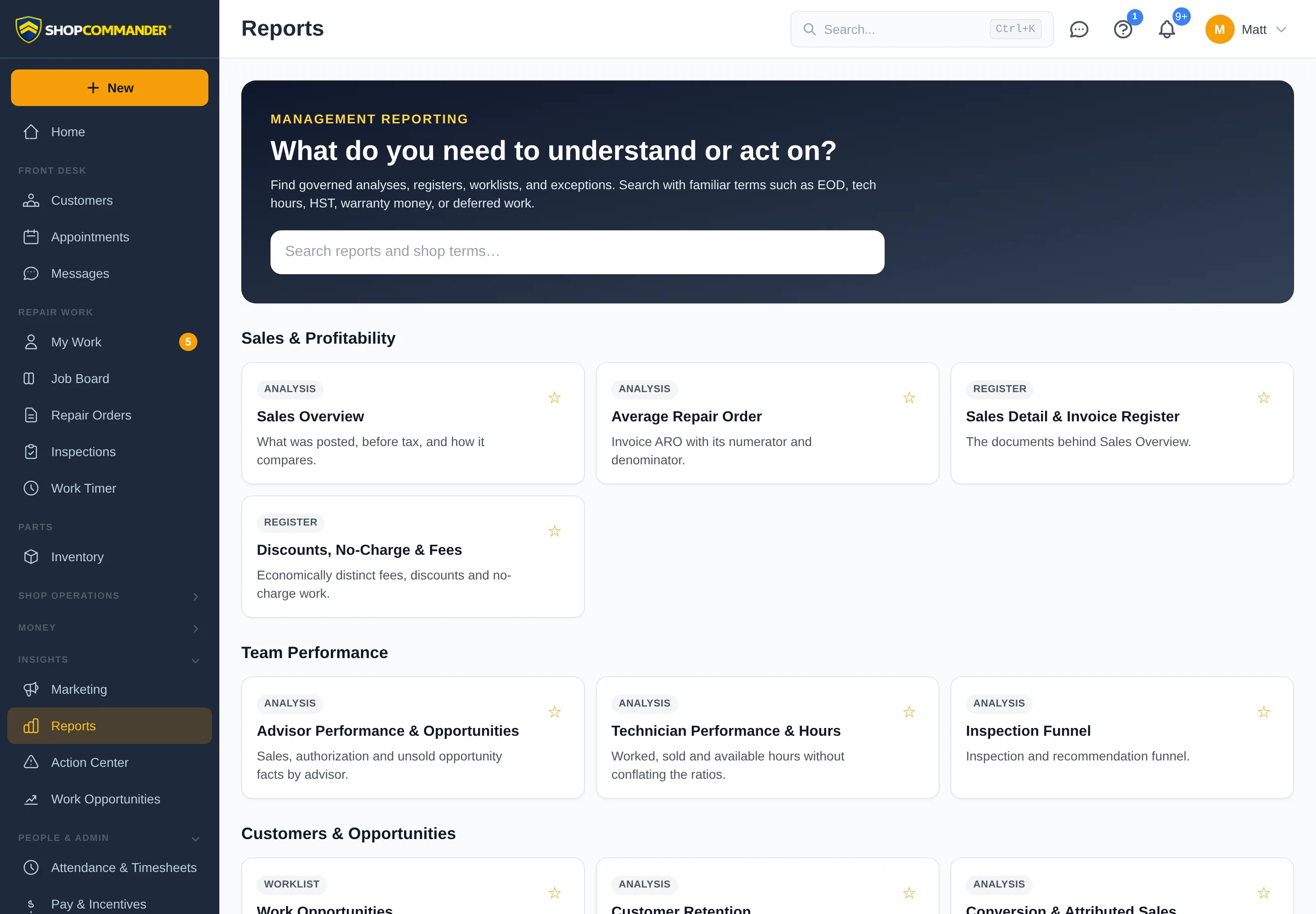
Real-time dashboards and reports that tell you exactly how your shop is performing — and where the money is hiding. No guesswork. No gut feelings. Just numbers.

Shop Commander reports home with governed analyses, registers, and worklists
Reports in Shop Commander — search it like you'd say it: EOD, tech hours, HST

Revenue Dashboard

Daily, weekly, monthly revenue with trend lines. Compare periods. Spot patterns. Know if this Tuesday is better or worse than last Tuesday — and understand why.

Average Repair Order (ARO)

Track ARO over time by service writer, by job type, by day of week. The single most important metric for shop profitability. If your ARO is flat, you know where to focus.

Technician Performance & Hours

Worked, sold, and available hours per tech — kept honest and never conflated. Know who's producing and who needs coaching. Fair, data-driven management.

DVI Metrics

Inspection completion rate, customer view rate, approval rate, average findings per inspection. Measure the effectiveness of your inspection process and optimize it.

Parts Margin Analysis

Track parts cost vs. sell price across all jobs. Identify margin leaks, compare markup by category, optimize your pricing matrix. Stop leaving money on the table.

Drill to the Documents

Every headline number opens into the register behind it — the exact invoices, payments, and jobs that add up to it. When a number looks wrong, you find out why in two clicks.

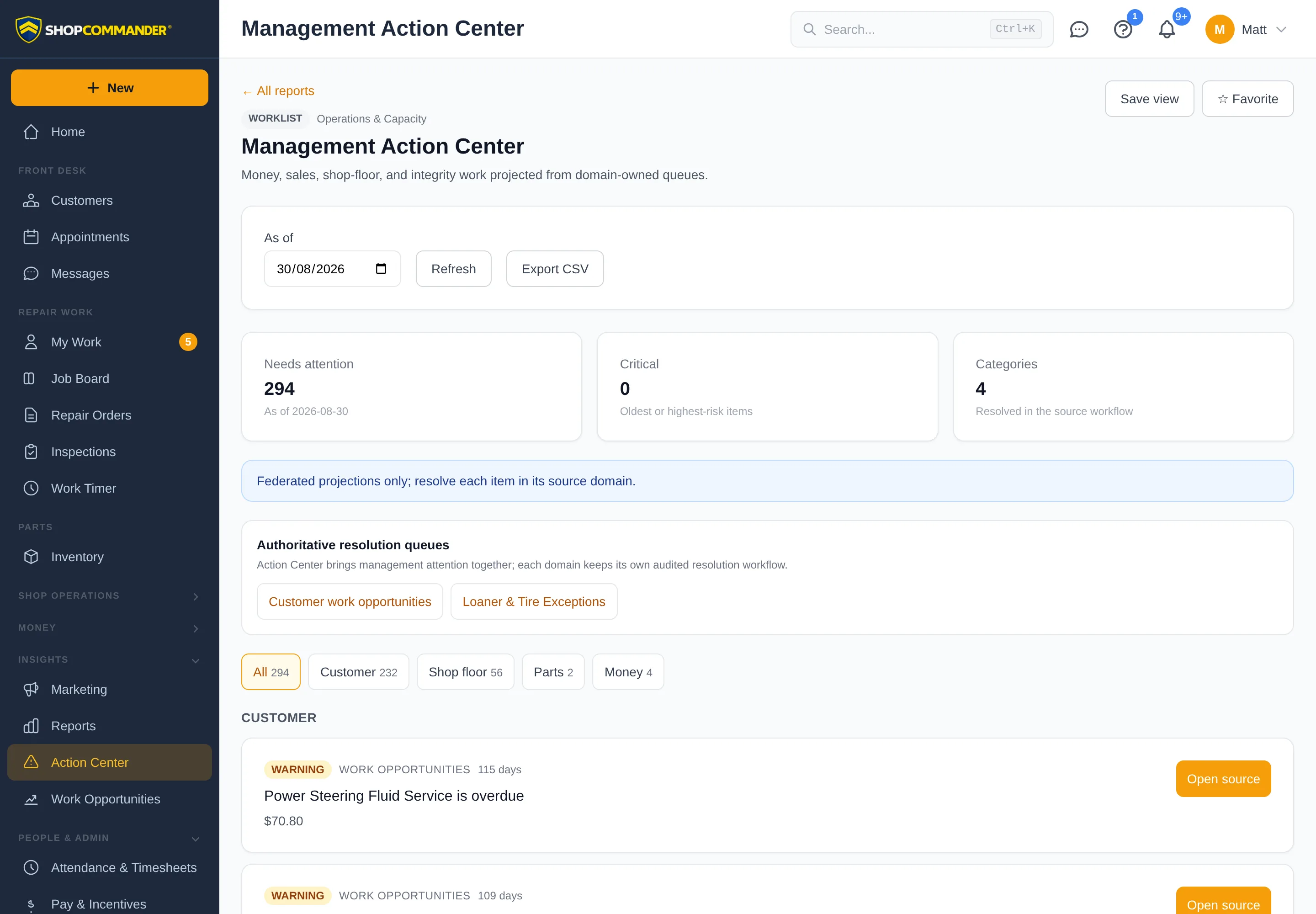
Action Center

Every exception that needs a management decision — overdue follow-ups, custody mismatches, unbilled work — in one prioritized worklist that deep-links to the source record.

Customer Retention

Visit frequency, lapsed customers, new vs. returning ratio, lifetime value trends. Know who's coming back and who you're losing — and use campaigns to win them back.

Shop Commander Action Center showing prioritized customer, shop floor, parts, and money exceptions
The Action Center — every exception that needs a decision, deep-linked to its source
🏢
Scale Without Limits

MULTI-SHOP & MULTI-TENANT

Run multiple locations from one account. Complete data isolation between shops with centralized admin controls. No "enterprise tier" required — multi-shop is free, like everything else.

Separate Shop Data

Each location's data is completely separate. No mixing of customer records, vehicles, or financial data between shops. Clean, organized, and compliant. Each shop is its own world.

Per-Shop Branding

Each location gets its own logo, colors, dedicated phone number, business hours, tax rates, and settings. White-labeled per tenant. Your customers see your brand, not ours.

Role-Based Access

Owner, manager, service writer, technician — each role sees only what they need. Granular permissions per user per shop. Your tech doesn't need to see revenue reports. Your advisor doesn't need admin access.

Per-Location Reporting

Every location gets the full reports suite scoped to that shop — revenue, ARO, technician efficiency, retention, and more.

🔗
Plays Nice With Others

INTEGRATIONS & PAYMENTS

The tools your shop already depends on, wired directly into the workflow. No extra tabs, no double entry, no "integration fees." Just connected systems that work.

Card Processing

Connect your payment processor and take cards by text-to-pay link, hosted checkout, or countertop terminal — credit, debit, Interac. Charges reconcile to the RO automatically via webhook. Cash and manual tenders work out of the box.

QuickBooks-Compatible Export

Export posted invoices as clean QuickBooks-compatible CSV — plus an exceptions report that tells your bookkeeper about anything the export couldn't represent. No silent gaps.

SMS & Voice Lines

Each shop gets its own dedicated phone number for texting — and the AI Voice Advisor answers on your shop's line. US and Canada.

VIN Decode

Free unlimited VIN decoding with 130+ vehicle attributes through the NHTSA database. No per-lookup fees. Vehicle data built into the workflow.

Got Questions?

FEATURES FAQ

Yes. Every feature on this page — digital inspections, two-way SMS, AI follow-ups, Kanban workflow, inventory, reporting, multi-shop, integrations — is included for every user at every shop. No tiers, no paywalls, no "upgrade to unlock" traps. See our pricing page for the full breakdown.
No. Unlimited users are included. Add as many service writers, technicians, managers, and admins as you need. Shopmonkey charges $20/month per additional user. We charge $0. Whether you have 2 techs or 20, the price is the same: free.
When a technician writes inspection notes in their own shorthand (like "frt brks worn 3mm need pads n rotors"), the AI rewrites it into professional, customer-facing language ("Your front brake pads are worn to 3mm and should be replaced along with the rotors to ensure safe braking performance"). Every rewrite is kept in the note history, so you can always see what the tech originally wrote. No other shop management software offers this.
Absolutely. Shop Commander works for single-location shops and multi-shop operations alike. The multi-shop features are there when you need them, and they don't get in the way when you don't. Most of our shops are single-location independents.
Yes. Tires, batteries, and fluids are first-class inventory families. Tires carry real sizes, seasons, and speed ratings and are searchable by size (like 225/45R17); batteries carry group sizes; fluids and supplies stock by the litre with decimal quantities. All of it lives on the same stock ledger as your generic parts — same reservations, purchase orders, receiving, and returns. And it's separate from tire storage, which tracks customer-owned seasonal sets.
Yes. Two-way SMS works in both the US and Canada. Each shop gets its own dedicated phone number. Automated status updates, estimate approvals, and campaign messages all work across both countries.
When we migrate your data, declined work history comes with it. The declined job recovery system can pick up where your old software left off — or more accurately, where your old software never started. Most platforms don't automate follow-ups at all. Contact us to start your free migration.
Shop Commander includes everything those platforms charge $200-$1,000/month for — plus features they don't offer at any price, like AI tech note cleanup, automated declined job recovery, seasonal tire storage tracking, and loaner vehicle management. See the full side-by-side comparison.
Yes. Your data is encrypted in transit and backed up automatically every night. Each shop's data is fully isolated in a multi-tenant architecture. We take security as seriously as we take building features — which is to say, very seriously.

ALL OF THIS.
$0/MONTH.

Digital inspections. Two-way SMS. AI follow-ups. Kanban workflow. Payments. Inventory. Reporting. Multi-shop. Every integration. Every feature. Every user. Zero dollars.

Stop overpaying. Start commanding. Learn why we built this.