Audit Log
Every change in the shop, recorded — who did what, to which record, and when.
The Audit Log is the shop's paper trail. Every create, update, and delete across the system is recorded with who did it, what changed, and exactly when — so "who changed the price on that estimate?" is a lookup, not an argument.
Reading the log
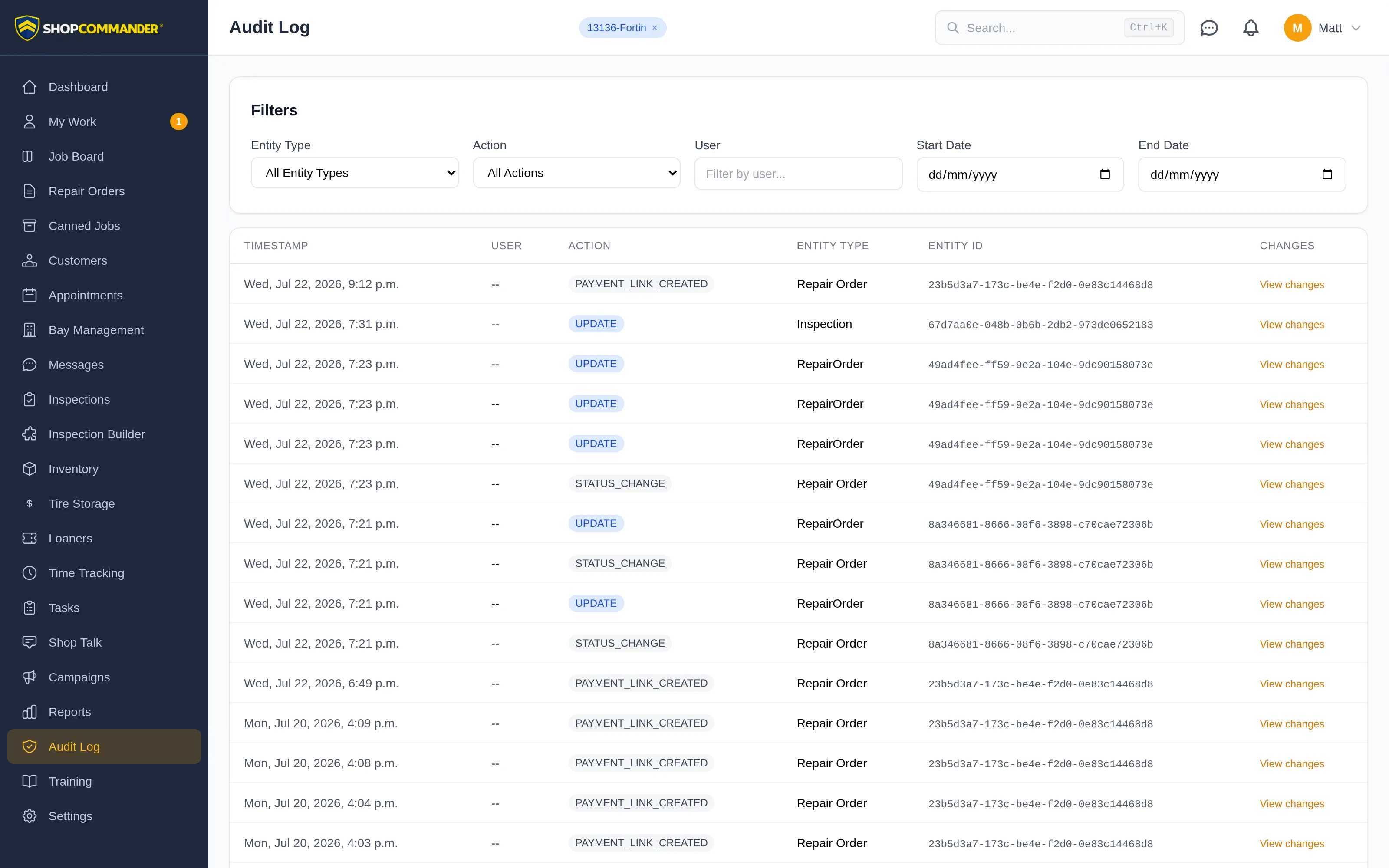
Each entry shows the timestamp, the user, a color-coded action badge — creates in green, updates in blue, deletes in red, plus specific events like status changes and payment links — the type of record touched, and a View changes link showing exactly what changed, old value to new.
Filtering
Narrow the log down with the filters across the top:
- Entity type — repair orders, customers, vehicles, appointments, inspections, inventory, invoices, users, settings, or campaigns
- Action — creates, updates, or deletes only
- User — one team member's activity
- Date range — any window you need
Filters combine, so "every delete Marcus made last Tuesday" takes four clicks.
Why it matters
Disputes end fast when the record is neutral. A customer questions an invoice change, a part count doesn't match, a status moved and nobody remembers moving it — the log answers without anyone having to reconstruct the day from memory. It's also the backbone of accountability when you're training new staff: mistakes get found, traced, and corrected instead of repeated.