Settings, Features & Integrations
Configure shop settings, Employees, Features & Modules, financial policy, providers, and readiness.
Settings is the shop’s configuration workspace. Tabs are shown only when the signed-in person has the applicable access and the feature exists.
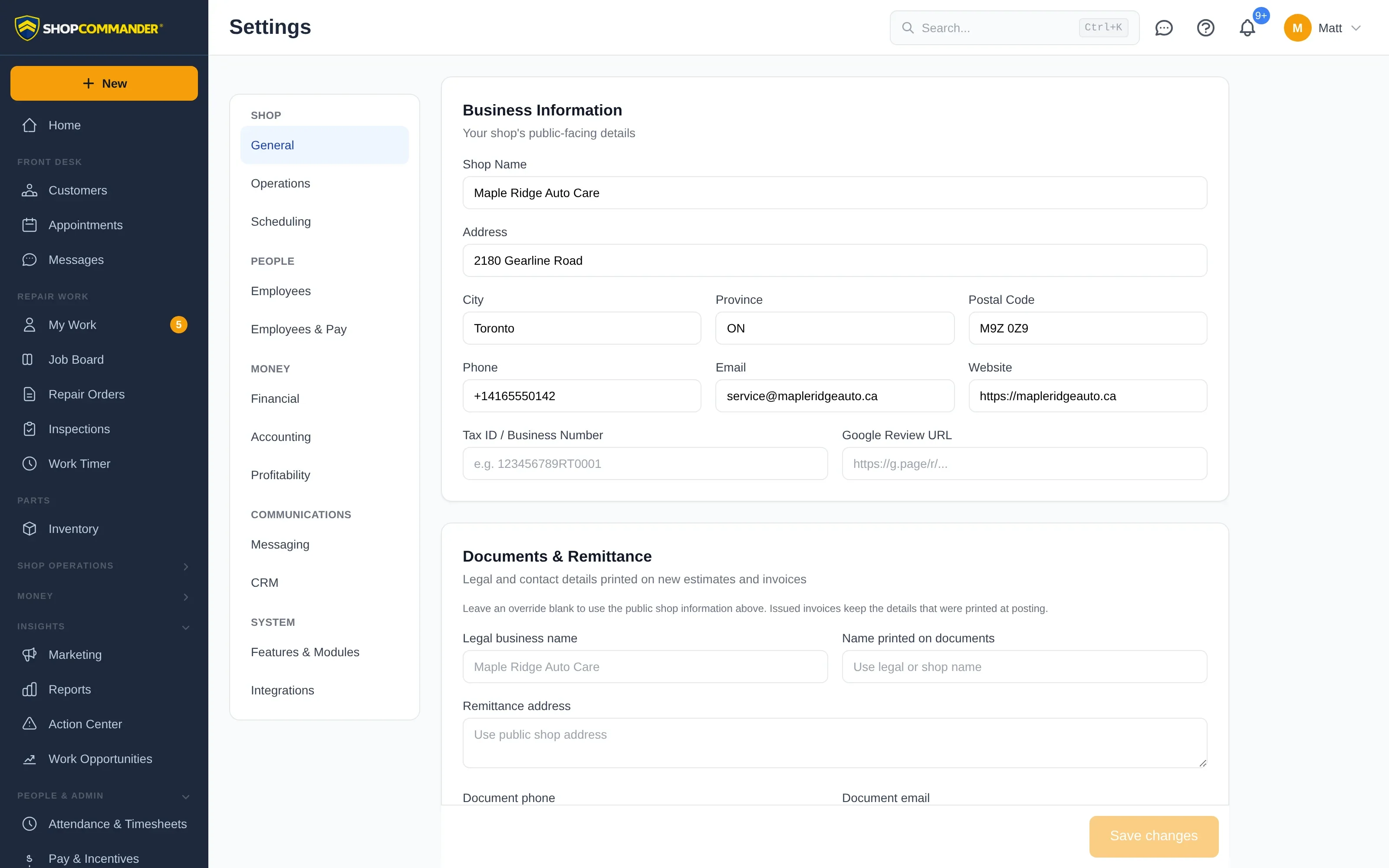
Business and document identity
Maintain shop name, address, contacts, locale, currency, timezone, branding, document terms, and related public identity. Setup Wizard writes through these same settings; it does not maintain a second copy. Province / State is one fact wherever it is entered — the two fields on the General tab always show the same value.
Business hours
Settings → Operations → Operating Hours takes an explicit choice for every day: Open (hours) with an opening and closing time, Open 24 hours, or Closed. A day you have not set is unknown: it is not offered for online booking, the voice assistant will not book it, and your hours only appear on the booking page, the customer portal and your website once all seven days are set. Shop Commander never fills a missing day in and never treats a 00:00–23:59 window as 24-hour operation — choose Open 24 hours if that is what you mean.
Employee access and removal
Everyone signs in with their own email address, so Add Employee asks for one and will not save without it — an account with no address would be an account nobody could sign in to. The username beside it is only the handle their name falls back to on screen.
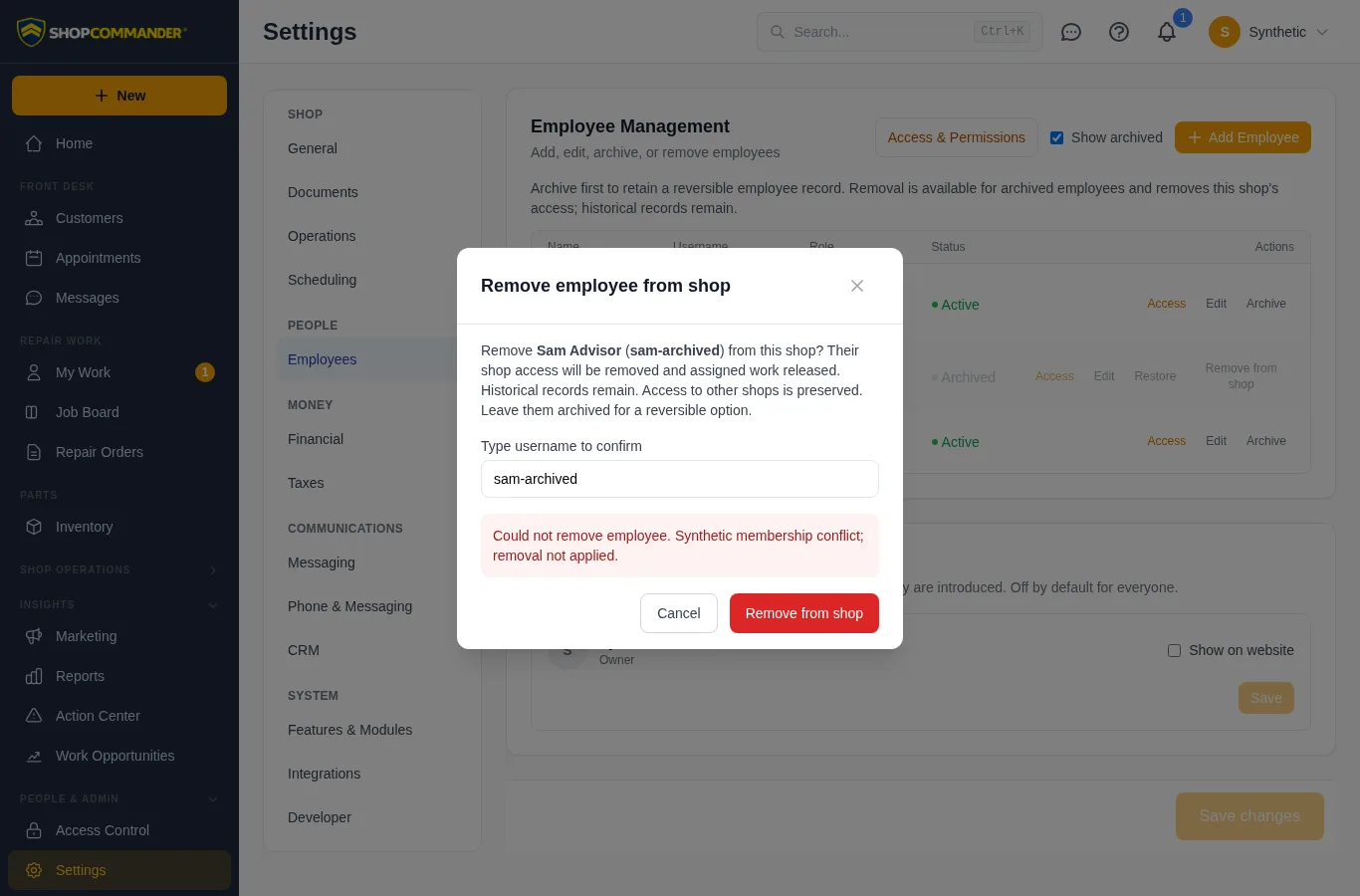
Settings → Employees marks your own account as This is you and prevents self-archiving. Archive a departing employee first; this preserves a reversible listing. Enable Show archived to restore them or, with removal permission, choose Remove from shop. Removal names the employee and username, explains the retained history and other-shop access, and requires typing the username. Pending removal blocks dismissal and repeated submission; a refusal keeps the dialog and its explanation available.
Public profile
Settings → General → Public Profile holds the facts customers read on your booking page and website that live nowhere else: a tagline, an "about the shop" paragraph, the year you were founded, amenities (waiting room, Wi-Fi, shuttle, loaners…), payment methods, languages spoken, social and review links, and your Google Place ID and map coordinates. Name, address, phone and hours are not repeated here — they come from Business Information and are never stored twice. Saving needs settings.edit; a save made after someone else changed the profile is refused until the form reloads.
Services catalog
Settings → Operations → Services Catalog is the list of services you advertise. Each entry has a customer-facing name and description, a category, a typical duration, an optional "from" price, and switches for Offer on the online booking page, Featured and Visibility. A service can link to a canned job so the shop-floor template and the advertised service stay connected without duplicating either. Add from the built-in catalog or create your own; reorder with the arrows. The seven services the booking page used to list are seeded for every shop, so nothing changes for customers until you edit the list.
Special hours
Settings → Scheduling → Special Hours records dated exceptions to your weekly hours: a holiday closure, a Saturday you open for tire season, or an exception that repeats every year. Online booking, the staff scheduling hours check and your website all read the same record, alongside whole-day closures kept under Scheduling → Closures.
Team on the website
Settings → Employees → Team on the Website decides who appears on your public team page. Everyone is off by default. Switching a person on lets you set a display name, title and short bio; their photo is the avatar they uploaded — Shop Commander never generates a staff image.
Domains
Settings → Domains (shown when the Custom Domains feature is on) is where a shop brings in the domain it already owns or registers a new one. Two facts about every domain are shown separately, because they are separate: where it is registered (through Shop Commander, or at the registrar you already use) and who manages its DNS (Shop Commander, or you). "Managed by Shop Commander" means Shop Commander runs the DNS — it never requires moving the registration.
For a domain you already own, the recommended choice is Keep your domain where it is and let Shop Commander manage DNS: at your registrar you change the nameservers to ns1.shopcommander.com and ns2.shopcommander.com, Shop Commander detects the change at the public registry, and from then on every record is rendered and repaired automatically. Nothing is transferred. The second choice, Keep managing DNS yourself, keeps your DNS provider: you add a one-time _sc-verify TXT (or CNAME) record to prove control, then the exact records each feature needs, and Shop Commander checks them through public DNS. Records are never changed for you, so a feature is active only while its records verify, and a record that drifts is reported rather than repaired.
The DNS records table lists everything served for a domain Shop Commander manages. Rows marked Managed by Shop Commander (the website addresses, certificate policy, and later mail records) are rendered from what the domain is used for and cannot be edited or deleted directly; you add your own A, AAAA, CNAME, MX, TXT, SRV and CAA records beside them. Conflicting records are refused with the reason — a CNAME beside another record, a second SPF, or anything at a name Shop Commander reserves.
Registering a new domain needs a registrant contact (stored encrypted, shared only with the registrar) and places the order through Shop Commander's registrar; renewals, auto-renew, registrar lock and transfer-out then live here. Move domain registration to Shop Commander is offered separately on a connected domain and is always optional — it changes only who you renew with. Managing domains needs domains.manage (Owner and Administrator); viewing needs domains.view.
Settings → Email (shown when the Hosted Email feature is on) hosts mailboxes on a domain whose DNS is managed by Shop Commander — where the domain is registered does not matter. Enable email on a ready domain, wait for public DNS, then add mailboxes with single-use setup links, aliases, a catch-all and a DMARC policy. Full guide: Hosted email.
Customer documents
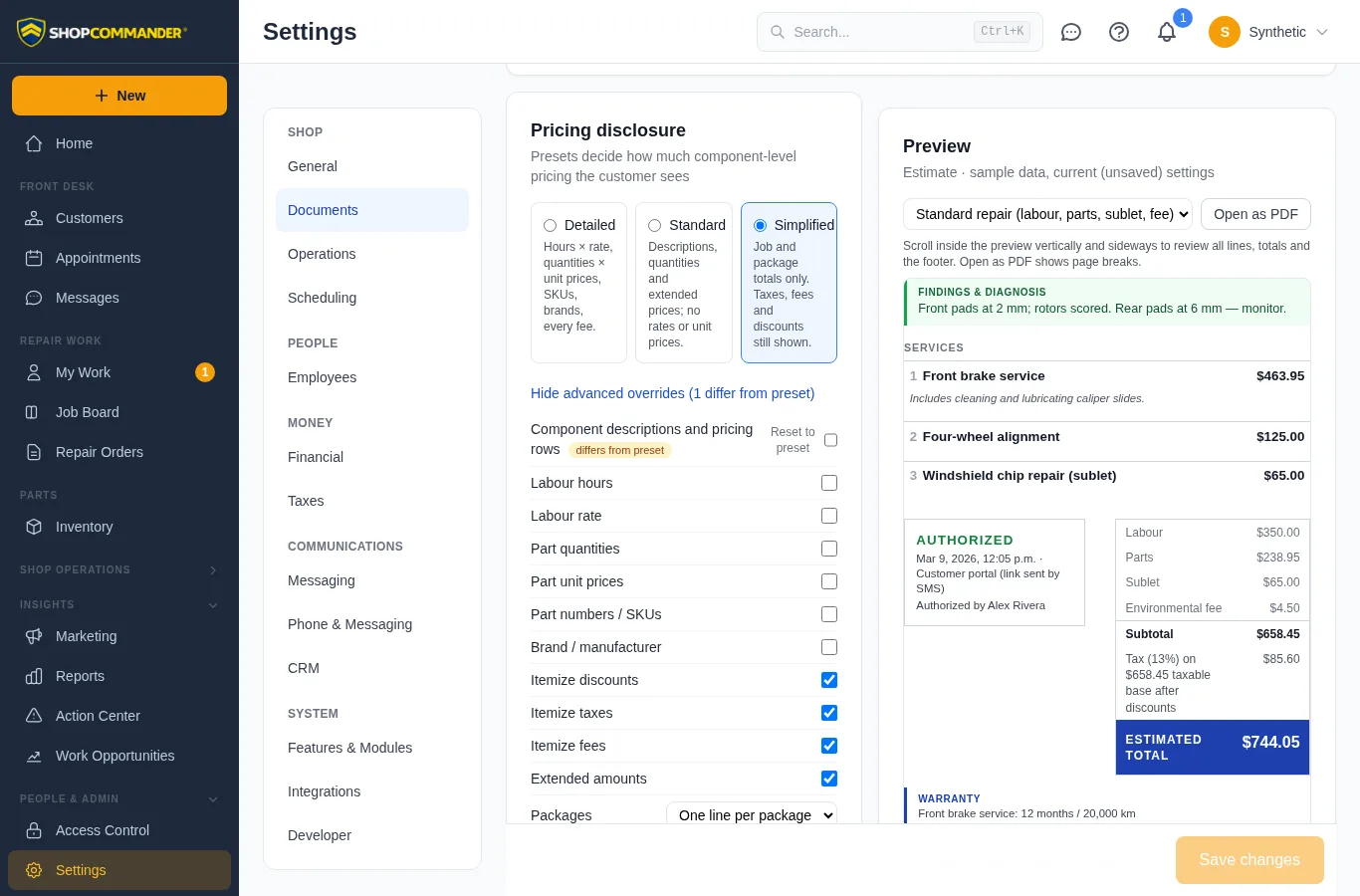
Settings → Documents governs every printed or shared customer document — estimates, invoices, credit notes, receipts, statements of account, work orders and inspection reports — from one place, with a live preview that renders sample data through the same engine that produces the real PDFs.
- Branding — logo (any aspect ratio fits a fixed box), trade or legal name, contact lines, tax registration numbers (the business tax ID and/or the per-tax registrations entered under Financial → Taxes), accent colour, footer and paper size.
- Customer & vehicle — which identity details print: phone, email, address, VIN, plate, odometer in/out, fleet unit number. Odometer readings follow the shop's distance unit (General → Region & Currency).
- Pricing disclosure — choose a preset: Detailed (hours × rate, quantities × unit prices, part numbers, brands), Standard (descriptions, quantities and extended prices), or Simplified (job and package totals only). Advanced overrides adjust individual fields. Component descriptions and pricing rows restores labour/part/sublet rows beneath job totals when needed; Simplified turns it off by default. Component price, quantity and identity switches apply to those visible rows. Package display still controls actual package jobs. Internal work orders retain their work details. Subtotal, discount, tax and the total are always shown — presentation settings never change the figures.
- Authorization — status (pending, authorized, partially authorized, declined, deferred, reauthorization required), date and time, method, authorized amount, per-job decisions and the captured signature. Only recorded facts print; nothing is inferred.
- Payments — history, method, reference, store credit and the remaining balance. Invoices carry a payment state: Balance due, Partially paid, Paid, Credit balance, Refunded or Void, always derived from the payment ledger.
- Policies & terms — estimate validity, disclaimers, authorization language, payment / late-payment / storage / abandoned-vehicle / warranty policies and jurisdiction wording. Policy text is frozen onto every posted invoice; editing it later changes new documents only.
- Advanced — technician names (off by default), service advisor, promised/completed dates, declined and deferred work, customer PO, job notes. The internal work order copy has its own switches for prices and internal notes and is always marked not for customer distribution.
Scroll inside the preview to inspect the complete document, including totals and the footer. Narrow screens may require horizontal scrolling inside the preview too; Open as PDF shows the printable pages. Previewing a change does not save it.
Pick Shop defaults or a specific document type at the top of the panel. A document type inherits every setting until you override it there; overridden fields show a pill and can be reverted individually. Saving needs the matching permission — branding, presentation or policies — and a stale form (someone else saved first) is refused until it is reloaded.
Canned jobs can be flagged Present as one package on customer documents so a service such as “Synthetic Oil Service $129.95” prints as one line when the pricing preset allows it; labour, parts and fees stay itemized internally for accounting, inventory and reporting.
Financial policy
Review the active tax profile/version, labor and pricing policy, fees, terms, and enabled business-office settings. Tax-profile acknowledgement in Setup is version-bound; changing the active version can change readiness.
Operations and scheduling
Maintain business hours, booking policy, capacity/bays, workflow requirements, and related operating choices. Appointment availability and configured Voice booking use the shop’s current policy; they do not guess around closed days or capacity.
Employees and Access Control
Use Employees for identity, invitation, role template, and active status. Use Access Control for effective permissions, overrides, scopes, and custom roles. Frontend visibility never grants backend authority.
Features & Modules
Enable only the workflows the shop uses. Turning a module off removes current navigation/actions/help leakage while preserving historical records. Enabling a module does not prove its provider or data source is Ready.
For Card Processing, Recently verified means the provider confirmed charges were enabled within the last five minutes. An account connection alone does not qualify. An expired or unavailable check shows Not verified; open Integrations → Payments for a fresh check. This status does not promise that a particular payment will succeed. Feature status refreshes when you return to the tab and periodically while it remains open.

Messaging, Voice, payments, and external data
Connected workflows expose readiness rather than assuming success. Review configuration, verification, provider state, consent, limits, and fallback for:
- transactional messaging and campaigns;
- Voice/AI workflows and human transfer;
- card processing and payment links;
- tire catalog/application/fitment/supplier sources and quote policy;
- any other supported integration visible in the current product.
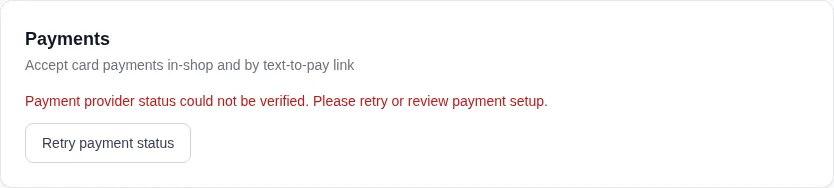
In Integrations → Payments, use Refresh payment status to check again. A provider read failure keeps an explicit error and Retry payment status; it does not report an active account. Returning from provider setup starts a fresh check before claiming readiness.
Do not assume a future ServiceFile integration, data migration, supplier connection, or import path because it appears in planning material. Only current configured integrations are supported.
Developer API
Settings → Developer issues API keys and webhook subscriptions so a website, fleet system, or accounting tool can work with this shop's data under scopes you choose — see Developer API.
Return to readiness
Open Setup & Readiness to see how current configuration projects into Required, Needs setup, Ready, or degraded outcomes. Readiness cannot be dismissed into success.
Correct a form refusal
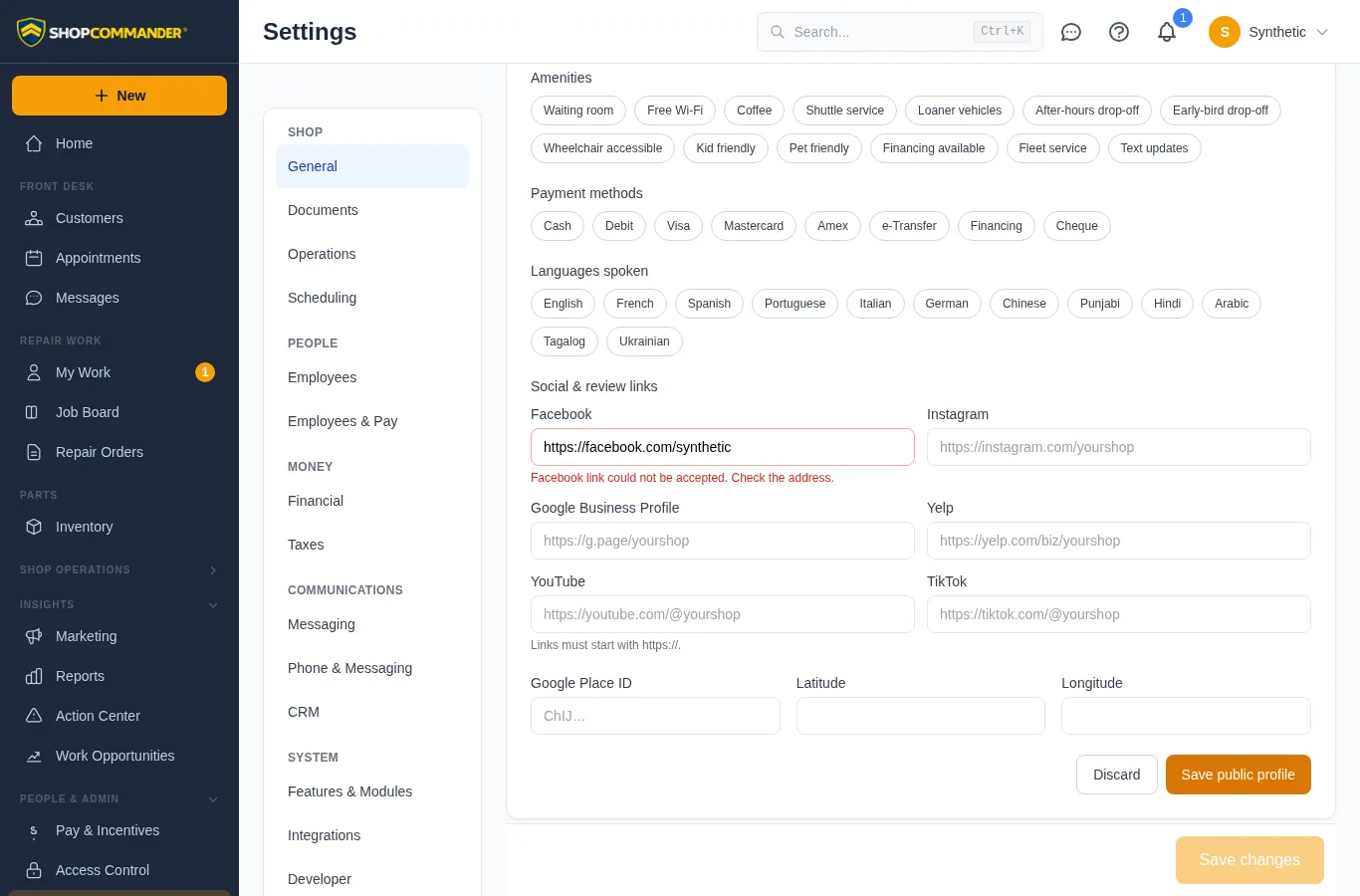
A validation refusal on Public Profile or an employee save keeps your entries and shows a persistent message. Fields named by the response are highlighted with their reason. Public Profile checks social links for https:// before sending; optional links may be cleared. Correct the highlighted entries and save again. A successful save clears the refusal.