Payments & Settlement
Post the invoice, record real manual tender or provider-confirmed payment, reverse corrections, and keep settlement separate from billing.
An invoice is the immutable commercial document. A payment is a separate settlement event. Completing work, posting an invoice, and collecting money are not interchangeable states.
Post the invoice
Open an eligible completed repair order, review the current totals and posting prerequisites, then use the normal invoice action. Posting freezes the document facts used by downstream registers. Guidance never posts an invoice for you.
Take a deposit before invoicing
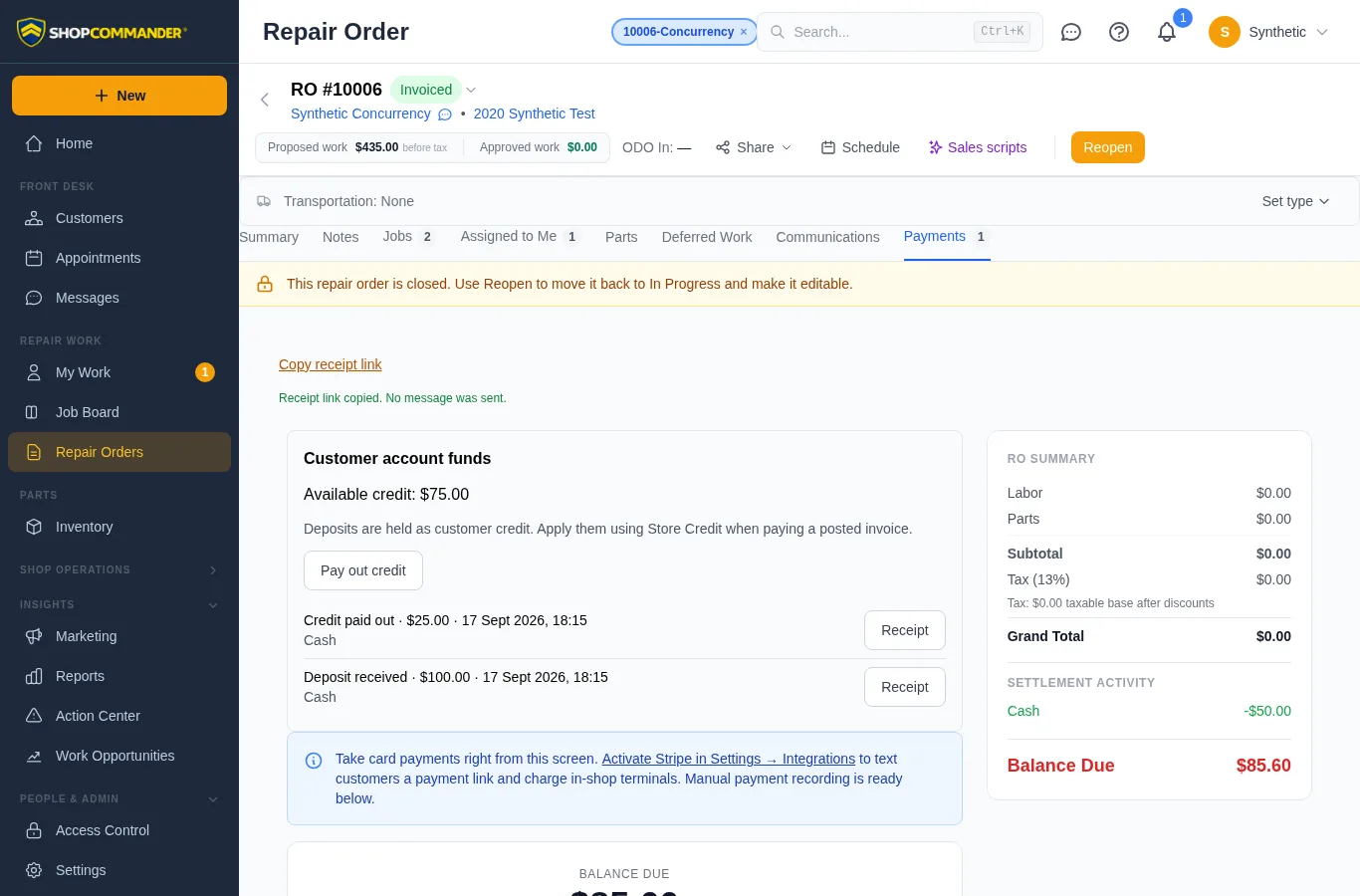
On an active, uninvoiced repair order, open Payments → Customer account funds → Take deposit. Enter the amount, actual method, reference and reason. Confirm that the cash, cheque or e-transfer has been received. Select an open cash drawer when the drawer module is ready. The deposit becomes available customer credit; it does not mark the work paid or create invoice revenue.
After posting the invoice, choose Store Credit in the payment control to apply the deposit. Any remainder stays on the customer's account. Account credit is shared across that customer's visits; it is not reserved to a particular order.
Use Receipt beside the account transaction to download its PDF. The receipt states the deposit amount and account balance immediately after the transaction.
Record manual tender
For real money taken outside a connected processor, use the repair order’s payment control and choose the actual method exposed by the shop—cash, card/debit, cheque, e-transfer/ACH, store credit, or other configured tender. Enter the amount actually received. Split/partial settlements create separate signed-ledger events.
Correct an invalid payment amount
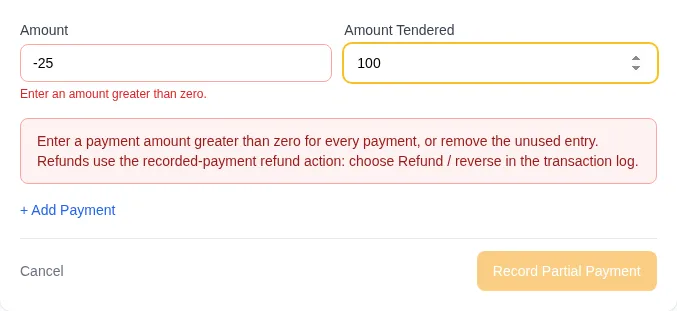
Every payment row needs an amount greater than zero. An invalid or blank amount keeps the draft visible and blocks collection, including split payments. Correct the amount or remove the unused row. A negative amount does not reduce the invoice balance or create cash change. To return a recorded payment, use Refund / reverse… in Transaction Log.
Connected card processing
Payment links, hosted checkout, virtual terminal, or reader workflows require the supported processor to be configured and Ready. Provider success must be recorded before ShopCommander presents the payment as complete. Provider fees and regional method availability belong to the provider relationship, not the core application claim.
Reverse; do not erase
If a payment was recorded incorrectly, use the available reversal/refund control with a reason. The original and reversing entries remain linked. A failed refund cannot make the invoice falsely unpaid or erase the original settlement history.
Verify the balance
The current balance follows the posted document and non-reversed settlement ledger. Use the Payment Register/Daily Close for reconciliation. Do not infer cash, bank settlement, warranty reimbursement, or store credit from an RO status alone.
Request help applying credit
If customer credit is available but you cannot apply it, choose Request credit assistance and select a colleague with the required payment permission. Assign credit review creates an assigned task linked to the visit and leaves your payment draft in place. Use Open request to follow up. The request does not apply credit or grant permission; wait for the current balance to refresh before collecting the remaining tender. This handoff requires permission to manage tasks.
Review and reverse a full payment
In Payments → Transaction Log, choose Refund / reverse… on the original receipt. Review its amount and method, enter a reason, select an open drawer for cash where required, then confirm. The signed reversal remains alongside the original payment and may reopen the invoice balance. Your role must have reversal, refund and any required reopening permissions.
Cash and cheque actions record money you physically return; provider payments use their connected refund path. Reversing a store-credit application restores account credit. This is a full-payment reversal, not a partial withdrawal of account credit. To return all or part of available account credit, open the customer’s Lifetime Value → Customer account funds → Pay out credit. Enter the amount actually returned by cash, cheque or completed e-transfer and confirm the movement. A payout has its own receipt, credit-history entry, cash-drawer entry where applicable, and signed payment-register entry. It does not reverse the source invoice's overpayment transfer or reopen that invoice.
To refund part of a paid sale, first issue the appropriate credit note, transfer the resulting invoice credit balance to the customer's account, then pay out that credit. The credit note corrects the sale and tax; the payout records returned money. Connected card refunds continue through the original payment's provider refund control; account payouts do not initiate a card or bank transfer.
The customer portal distinguishes invoice totals from remaining balances and lists available store credit separately. Credit is not automatically applied to every unpaid invoice.
Give the customer a receipt link
After a posted invoice has a payment, Copy receipt link is available in the RO’s Payments tab, Share menu and invoice sharing dialog. It creates a private customer document link and copies it without sending SMS or email. It works independently of SMS setup and on phones. If clipboard access fails, a selectable private link appears for manual copying; retry also reuses the link already created while the control remains open. Sharing requires customer communication/contact, sale-price and payment visibility permissions. Existing expiry and revocation controls apply.
Customers can also download released invoice and receipt PDFs from their vehicle’s portal timeline while both the portal and invoice release remain current. If a download fails, its error stays visible and the customer can retry or ask the shop for a current link.