Repair Orders
Carry customer concern through estimate, authorization, assignment, work, invoice, and settlement on one governed record.
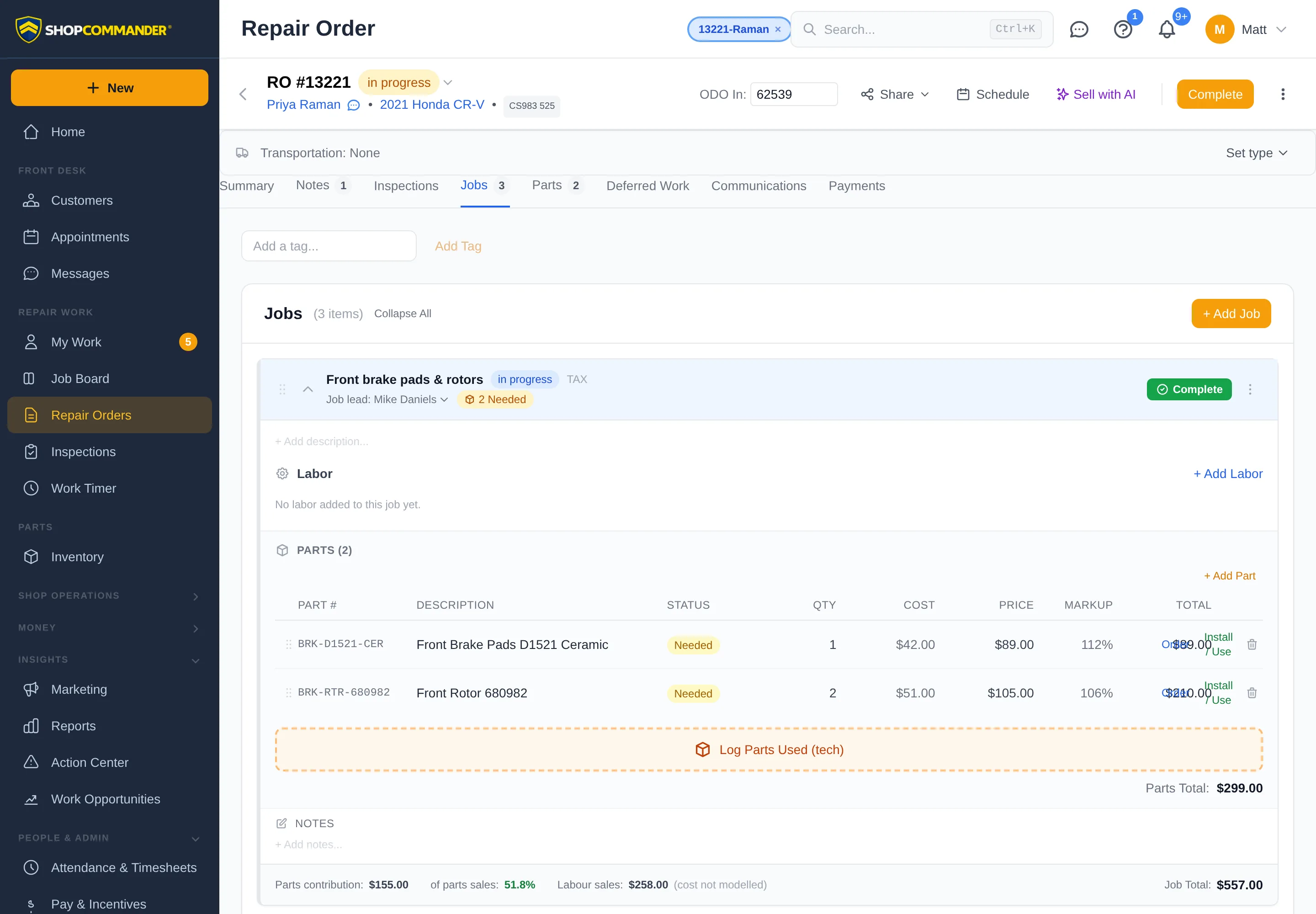
The repair order is the durable identity for the shop visit. Its workspaces keep customer, vehicle, concern, commercial revisions, customer decisions, assigned work, inspections, parts/materials, invoice, payment, notes, and activity connected.
Create the record
Open Repair Orders → New Repair Order, search for the correct customer and vehicle, then record the actual concern and visit context. If the identity does not exist, create it through the normal customer/vehicle controls rather than entering an unlinked name.
Add work
Add service lines individually or from governed canned jobs. Each line can carry labor, parts, sublet, description, assignment, customer decision, and applicable warranty terms. Reordering presentation does not change prior commercial or authorization evidence.
Assign a Technician or Apprentice
On an eligible editable repair order, use the current assignment control for the service line/job. Assignment sends work to My Work. Ready and Waiting state still depend on current authorization, parts, DVI, review, and other prerequisites.
Follow the primary action
The repair-order primary action reflects the current lifecycle and effective authority. Do not force a status to imitate completion. A failed prerequisite or mutation cannot render Authorized, Completed, Invoiced, or Paid.
Parts and materials are different handoffs
Inventory-linked parts use the stock/reservation/purchasing workflow. A Technician’s quick materials entry is only an actual-use scratchpad; the Service Advisor later decides whether it becomes a billed part, inventory-linked line, shop supply, no charge, or record-only note.
History and correction
Commercial revisions, authorization evidence, posted invoices, payments/reversals, assignments, notes, and lifecycle changes retain history. When current facts change, ShopCommander adds the new fact or correction instead of silently rewriting prior evidence.
Next: Estimates & Authorization.
Arrange a shuttle
Choose Shuttle in Transportation, then Arrange shuttle pickup. Enter the pickup location, destination, shop-local pickup time, and driver or coordinator. Assign pickup creates a Transportation task linked to this customer and visit. Its owner, requested time, and task status appear on the repair order. Open the task to confirm arrangements and update progress; assignment itself does not confirm a driver is available.
Pickup odometer on an invoice
After pickup, customer invoice views and PDFs include a labelled Pickup update with the recorded pickup time and permitted odometer-in/out readings. This later visit information is separate from the invoice values as originally posted.
Conflicting price edits
Labor and part editors retain the version you started editing. If another person saves first, your change is refused and your draft stays visible beside the latest saved value. Review both before choosing Use latest version for my next save, or Discard my draft. This does not retry automatically.
Fees and sublet charges have their own rows in the order summary. Tax details show the taxable base after discounts; a non-taxable fee can make that base smaller than the subtotal.
Discount permission and refused charges
The Add Job menu offers Discount only when your role can apply discounts. Otherwise it explains that manager approval is required. Fee and discount refusals stay inside their dialog with the entered name, amount and reason; review the explanation before retrying. A refused charge does not change the order total.
When your repair-order list is limited
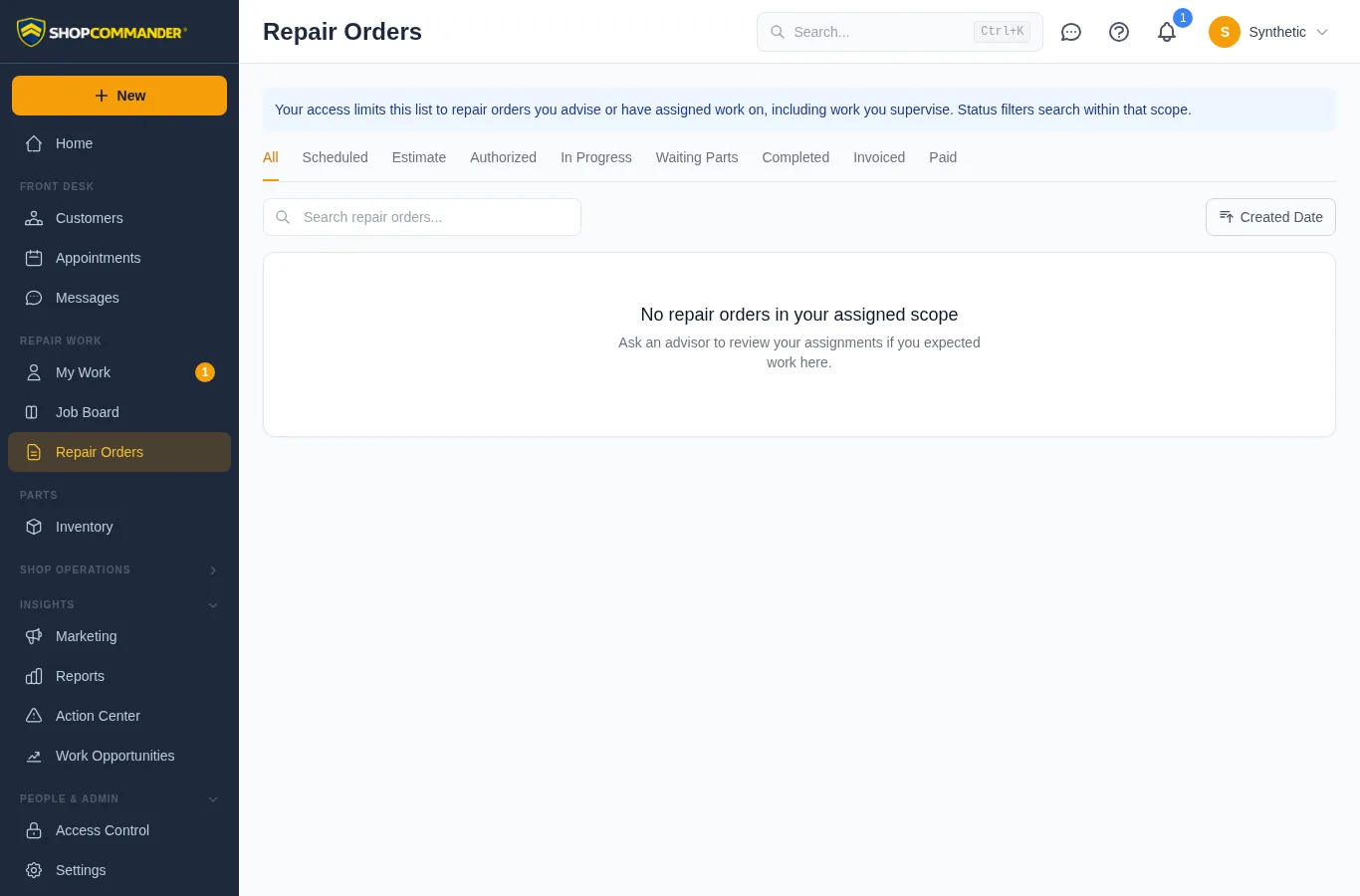
If your access is limited to assigned work, a notice above the status tabs explains which orders you can see. Changing a status or search filter stays within that access. An empty list does not prove the shop has no orders; ask an advisor to review your assignments if expected work is missing. Create controls appear only when you can create repair orders.
A failed request shows Repair orders unavailable with Retry, rather than claiming the list is empty. Retry keeps your search and status filters. Access and assignment decisions remain enforced by the server.
Required parts before starting
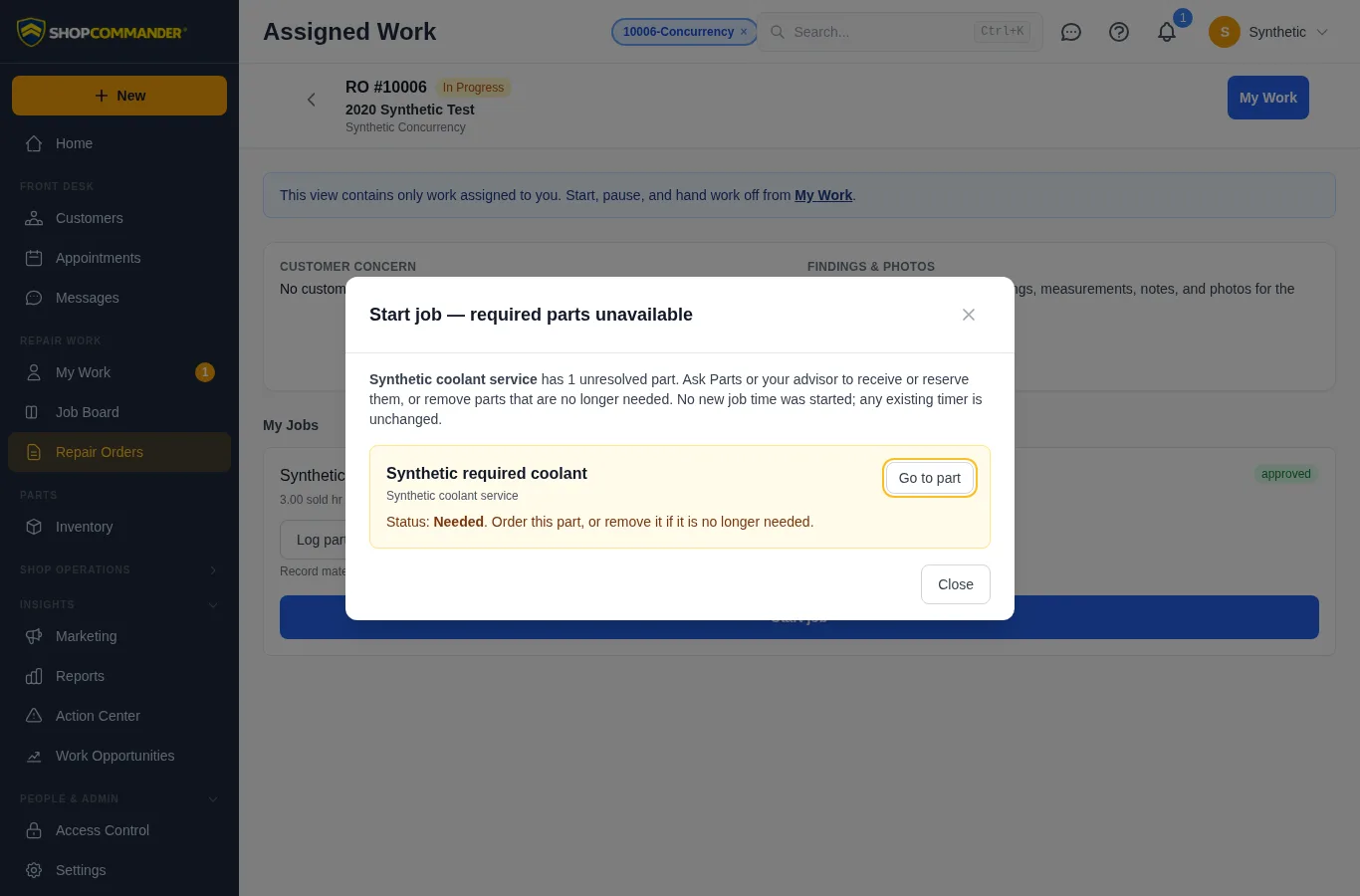
A job with parts still needed, short or on order offers Review part blocker. Ask Parts or your advisor to receive or reserve the material, or remove a part that is no longer required. Reserved stock and received parts allow work to start; completing the job still requires recording installation or return.
If availability changes after the screen loads, starting the job or its productive timer is refused with the part identified. The refusal leaves the job unchanged and preserves any existing timer, including when switching from another job. Use Go to part to review the material.
Move a draft job to the correct visit
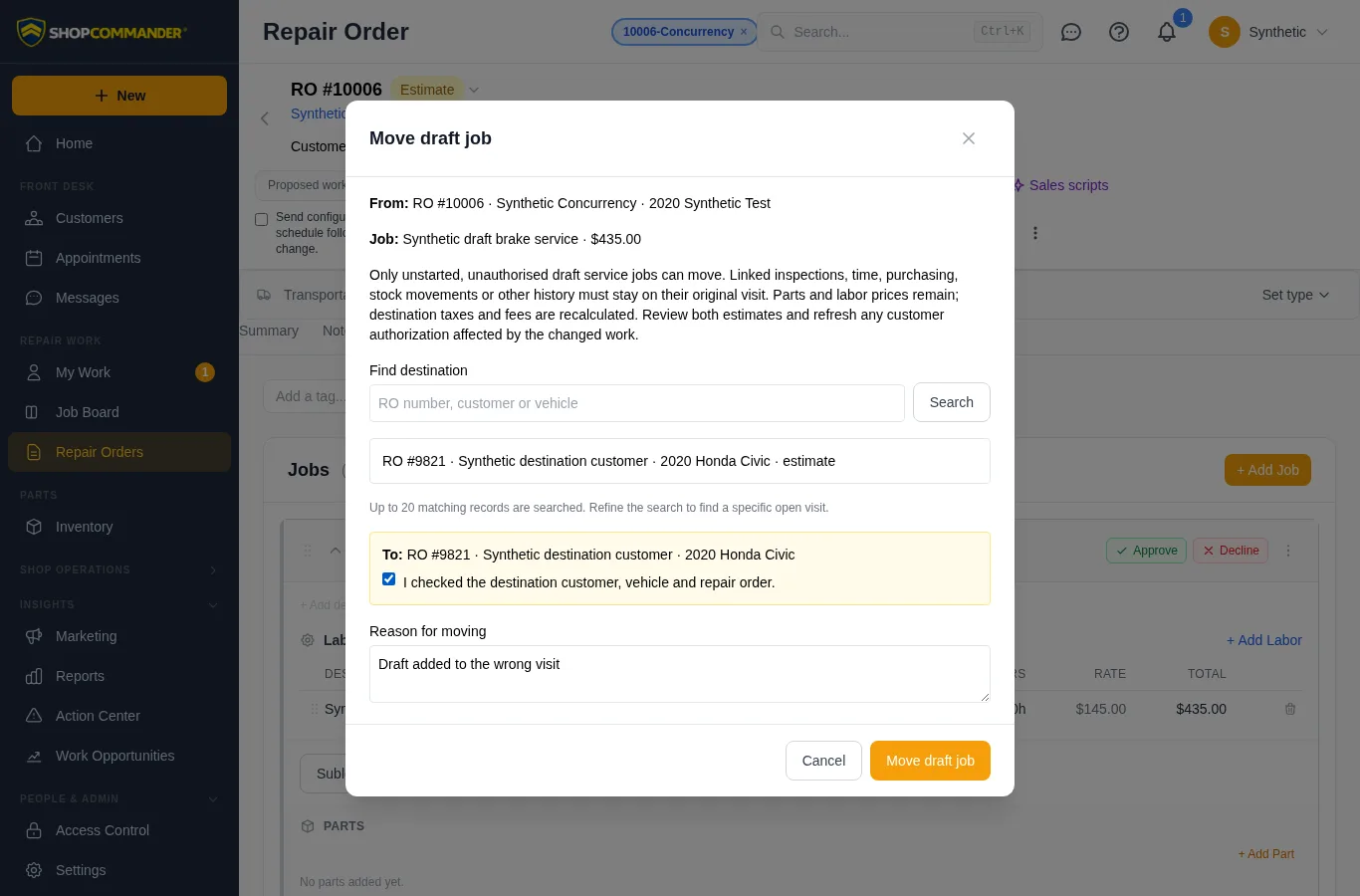
For an unstarted pending service job, open More job actions → Move to another repair order…. Search for the destination, check its customer and vehicle, confirm the destination and enter the correction reason. You need permission to edit, create and delete jobs and preserve labor and part pricing.
A successful move retains the job, part and labor identities and their prices, recalculates destination taxes and fees, and records the reason in both visits’ activity. Review both estimates and any affected customer authorizations before sharing them.
Work with authorization, time, inspection, ordering, stock or other history must remain on its original visit. Ask a supervisor to resolve that work before adding work elsewhere. Completed or invoiced visits cannot receive a draft.
If either visit changes during your review, the dialog retains your reason. Choose Reload both repair orders, check the destination again and confirm deliberately. If a connection fails after saving, retry uses the same move reference. If the job has already left the source, open the destination and check its history before starting another move.
Technician handoff and recorded labor
In Assigned Work, the primary technician can choose Hand to another technician for unfinished work. The confirmation requires a recipient and handoff note. The outgoing timer stops, the receiver starts their own timer when ready, and recorded labor/time retain their original attribution. See My Work for the full workflow and conflict recovery. Work with a recorded handoff stays on its original visit.
Deferred work from earlier visits
The Deferred Work tab labels each opportunity with its original Deferred or Declined decision and date. Add to RO requests fresh authorization on the current visit. A failed queue lookup offers Retry deferred work and does not imply that no work exists.