Setup & Readiness
Use the optional Setup Wizard, understand launch blockers and provider readiness, and resume configuration without creating false completion.
Shop setup, employee learning, and first real work are separate in ShopCommander.
- Setup changes the shop’s real configuration through the same rules used by Settings.
- Readiness is a live outcome ledger computed from current configuration, capabilities, permissions, and connected-provider state.
- Role orientation teaches a person’s workspace and remains optional and replayable.
- First-use milestones come only from real business records and events.
Start, explore, close, or resume
An authorized Owner or Administrator can start the optional Setup Wizard from Getting Started. You may explore the application, close the wizard, or resume later. Those actions save orchestration progress only; they cannot mark the shop Ready, complete a readiness item, enable a module, or create customers, repair orders, invoices, payments, or training records.
Wizard steps
The current wizard covers:
- Welcome — what setup changes and what remains separate.
- Your Shop — business/document identity, region, currency, timezone, and current tax-profile review.
- What You Use — enable only the Features & Modules the shop intends to operate.
- How Work Runs — scheduling and operating policy.
- Staff & Access — Employees, role templates, and Access Control ownership.
- Customer Communications — messaging and Voice choices plus provider readiness.
- Payments & Business Office — manual settlement policy, optional processing, and enabled office workflows.
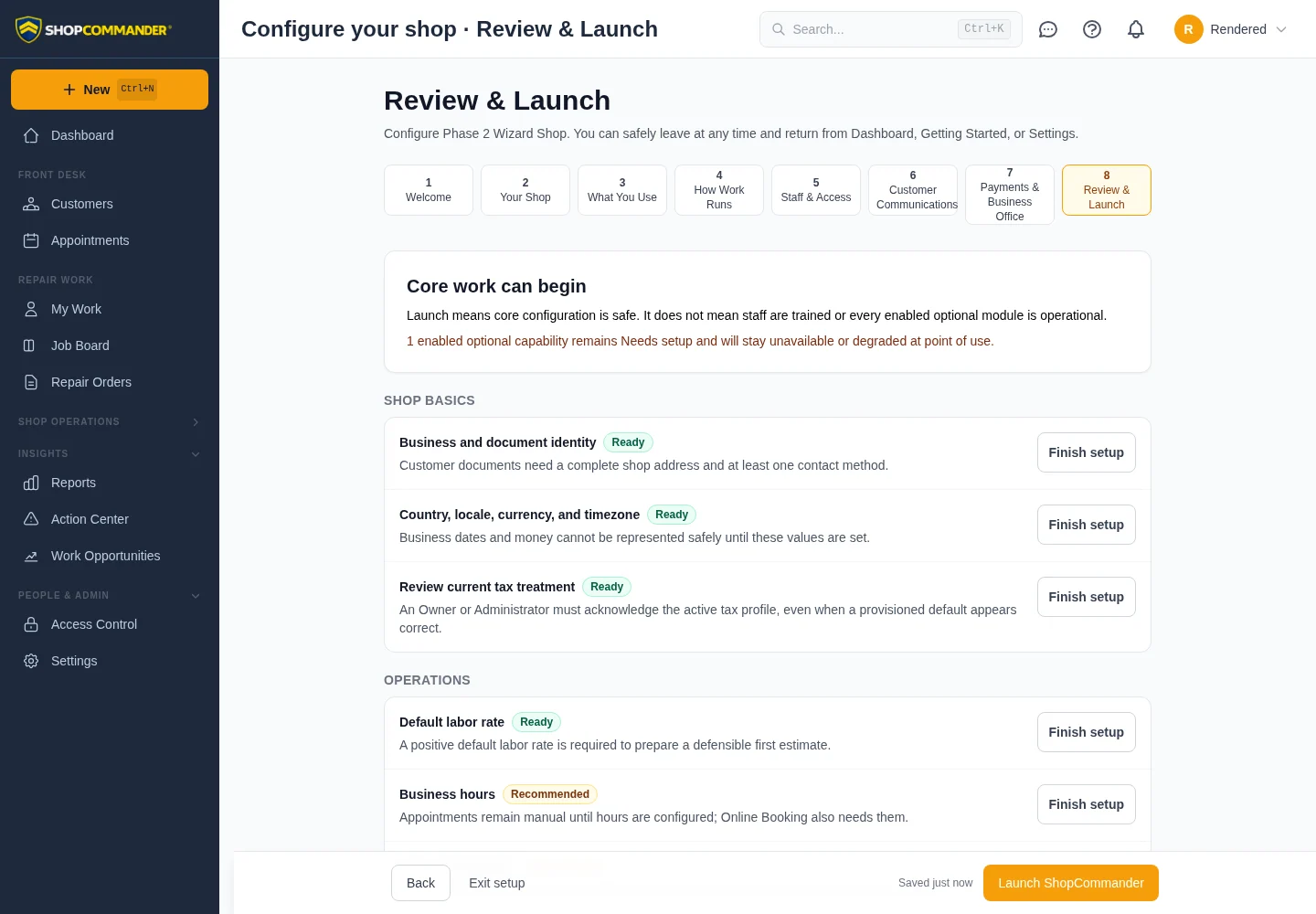
- Review & Launch — the live readiness ledger and exact blockers.
What blocks launch
A required item in Blocked state prevents core launch. Current tax-profile review and acknowledgement of its exact active version is always a core blocker. Dismissing or leaving setup does not bypass it.
An enabled optional capability may remain Needs setup without blocking core launch. It stays visibly unavailable or degraded at its point of use until its configuration/provider becomes Ready.
Provider states are not interchangeable
Connected workflows use truthful readiness states: Disabled, Enabled, not configured, Configured, Verifying, Ready, Degraded, and Provider unavailable. A person without recovery authority receives the safe consequence and who must act, not provider secrets or bypass instructions.
After launch
Readiness stays permanently reachable. Changing tax, hours, features, staff access, payment policy, or provider configuration can change later readiness. Launch is not a promise that every optional provider is operational.
Use Settings for the shop’s current configuration and Access Control for actual authority.